
GTA Technology Topics, Tips & Tricks: Google Search [You Disappoint Me]


I wanted to bring to your attention the continuing demise of the quality of Google Search. This is just not my own opinion but the opinion of some others as well, as illustrated in the articles below. So I am advising you to be more critical using Google Search for your information needs. Why am I emailing you about this? It is our responsibility, as information workers, to be critical of the resources we use for ourselves and our clients and not always assume resources relied upon for years continue to be effective.
Google Search is swinging away from a pure search algorithm (which hasn’t been that great lately anyways due to Google’s “freshening” up their algorithm), to the inclusion of social results related to the topic searched on (Google+). That’s what that +1 means at the end of some of the search results links – Google integrating Google+ results into Google Search.  The Google+ tagline is “Google+: real life sharing, rethought for the web.
“What I dislike about Search plus Your World isn’t that Google has more deeply integrated social data on its search results pages. It’s that the search engine has gone overboard with Google+ in a way that makes me feel like I’m being force-fed a new social network. It’s too much, too soon.”
June 1, 2011 – Eric Schmidt: Google wants to get so smart it can answer your questions without having to link you elsewhere [original statement of intent for the future of Google Search]
January 12, 2012 – Google’s Search Update Could Warrant an FTC Probe [due to potential inclusion of personal information from Google+ in search results]
January 13, 2012 – Google+ Search Controversy Grows
How to Turn Off Google’s Personalized Search Results [I think if you have a Google+ account, which I don’t. I tried this procedure but I had no “personalized results” option in my settings.]
Great State of Search blog post: The Unexpected Backlash of Google Plus Your World.
Obviously, I don’t approve of the new changes but I’d love to hear your comments or even a differing opinion!
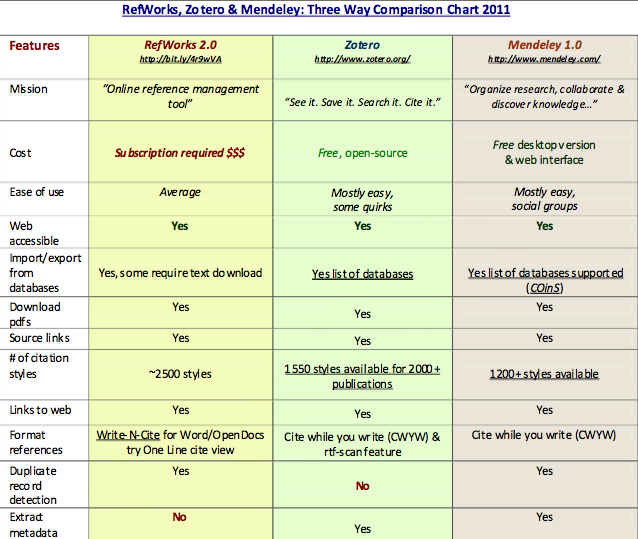
GTA Technology Topics, Tips & Tricks: Citation Management with Zotero


Ok so my recommendation of this tool comes from word of mouth and not personal experience, as I have never used it. But I have used RefWorks and I don’t bother with it anymore because its always hit and miss importing citations from databases. I have heard good things about Zotero though!
 
I would recommend its use for students who have to manage citations from a lot of different resources (databases, web pages, images, digital objects, etc.) or for those students who are involved in large research projects, directed studies, theses, etc.

 
Zotero is free. The program uses an Internet Plug-in for importing citations.
 
The original Zotero works only in Firefox. Zotero 3.0 beta version works on all operating systems, on any browser. Download either version at the link below.
 
Here is a discussion of Zotero 3.0, the beta version, from Dean Giustini of The Search Principle blog (UBC prof).
http://blogs.ubc.ca/dean/2011/08/here-comes-zotero-3-0-beta-for-a-new-term/

 
Here is a Beginner’s Guide to Zotero SlideShare presentation.
 
Here are screencast tutorials.
 
Comparison of RefWorks/Zotero/Mendeley from The Search Principle.


GTA Technology Topics, Tips & Tricks: Google Advanced Search and Other Tips


Here is a great infographic for getting the most out of Google!

GTA Tips & Tricks: A Few Research/Reference Resources


ALA (RUSA) Mars Best Free Websites
The 2011 Best Free Reference Websites. Quality websites on specific topics – fun to browse and see what’s out there.  It was interesting to see WikiLeaks on the list but I’m not surprised at TED.


University of Alberta LIS Subject Guide
If you have not yet discovered the Library and Information Studies Subject Guide on the University of Alberta Libraries website, I encourage you to review this resource as there are a variety of useful goodies, such as lists of LIS Databases & Journals and in depth resources on specific LIS topics.


Web of Science (see series of images below)
Not yet heard of citation mapping? Well this is a tool that can help you find related research articles by mapping references (citations) of other researchers who have cited the article. A popular arts and humanities, science and social sciences citation mapping database is called Web of Science.


Enter your search terms on the search page and press enter. Click on the link for an article of interest to you. Then click on the “Citation Map” link (note not all articles will have a citation mapping link).  Choose which direction to map and click on “CREATE MAP” at the bottom right of the screen. Then have fun exploring that citation map!!! There are some other features to Web of Science and I have only described here one of its most powerful tools.
Web of Knowledge [v.5.3] - Web of Science Full Record.jpg
_Users_jnmullings_Desktop_image2.jpg-2.jpg


Web of Knowledge [v.5.3]-1.jpg