
Ok so my recommendation of this tool comes from word of mouth and not personal experience, as I have never used it. But I have used RefWorks and I don’t bother with it anymore because its always hit and miss importing citations from databases. I have heard good things about Zotero though!
I would recommend its use for students who have to manage citations from a lot of different resources (databases, web pages, images, digital objects, etc.) or for those students who are involved in large research projects, directed studies, theses, etc.


![Web of Knowledge [v.5.3] - Web of Science Full Record.jpg](https://mail.google.com/mail/u/1/?ui=2&ik=a20a99b458&view=att&th=132d59e83319c032&attid=0.2&disp=emb&realattid=ii_132d25e7a5b07570&zw "Web of Knowledge [v.5.3] - Web of Science Full Record.jpg")

![Web of Knowledge [v.5.3]-1.jpg](https://mail.google.com/mail/u/1/?ui=2&ik=a20a99b458&view=att&th=132d59e83319c032&attid=0.1&disp=emb&realattid=ii_132d26ee91ee385a&zw "Web of Knowledge [v.5.3]-1.jpg")
Zotero is free. The program uses an Internet Plug-in for importing citations.
The original Zotero works only in Firefox. Zotero 3.0 beta version works on all operating systems, on any browser. Download either version at the link below.
Here is a discussion of Zotero 3.0, the beta version, from Dean Giustini of The Search Principle blog (UBC prof).
http://blogs.ubc.ca/dean/2011/08/here-comes-zotero-3-0-beta-for-a-new-term/
Here is a Beginner’s Guide to Zotero SlideShare presentation.
Here are screencast tutorials.
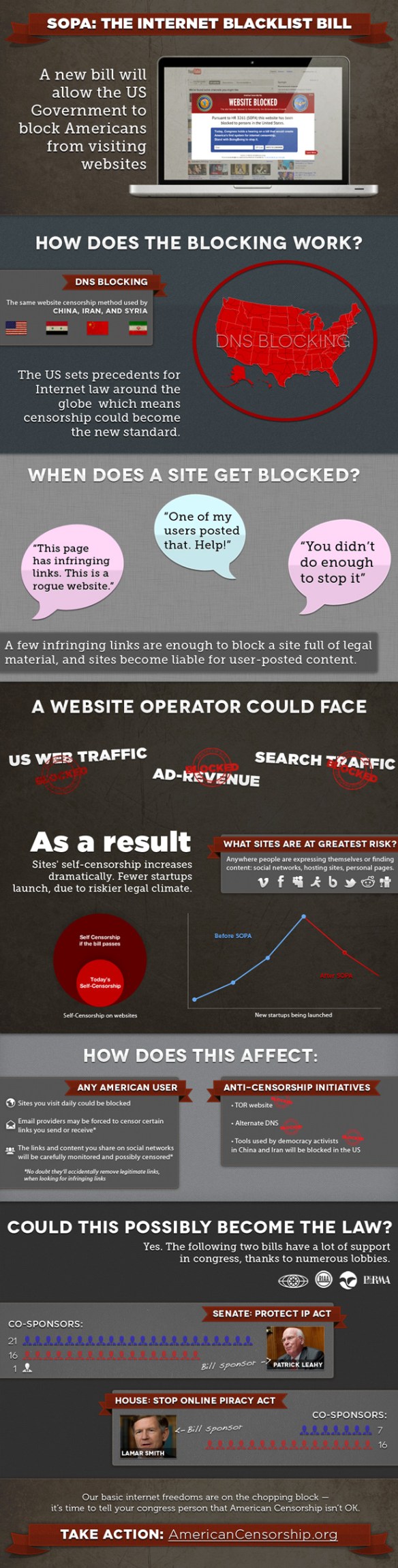
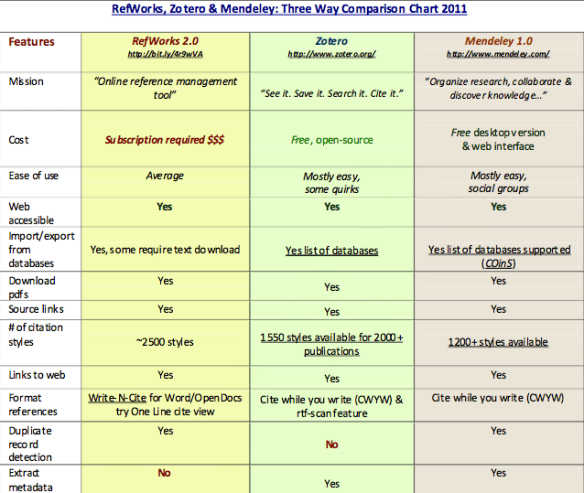
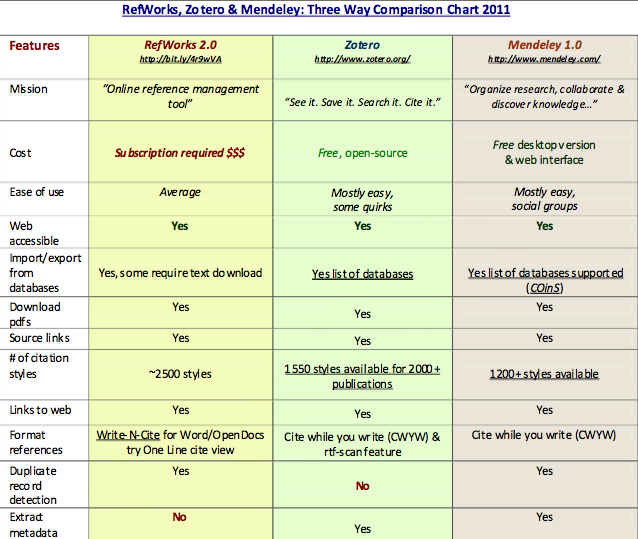
Comparison of RefWorks/Zotero/Mendeley from The Search Principle.
GTA Technology Topics, Tips & Tricks: Google Advanced Search and Other Tips

GTA Technology Topics, Tips & Tricks: Password Protection!
I took LIS 598 Information Security this summer and we were given an eye-opening demonstration of just how easy it is for someone to crack passwords and invade systems wirelessly. That someone could be a computer in another country running an automatic script 24/7 or someone sitting in a vehicle on the street near your home. Here are five rules to follow for password protection:
Rule 1: Never share a password. Especially, NEVER EMAIL usernames and passwords.
Rule 2: Make passwords complex. Incorporate special characters, capital letters and numbers and make them at least 8 characters long.
Rule 3: Know that you are more vulnerable than you think. Most hackers will not “announce themselves” with a Rick Roll if they have penetrated your account.
Rule 4: Never leave your desktop computer, laptop or mobile device unattended and without some additional layer of security (password required to login).
Rule 5: Change passwords every few months and vary passwords for every account.
If you have trouble remembering passwords, password management software such as 1Password for Mac OS X or for Windows KeePass (free & open source) orLastPass can help. There are a lot of other password management tools out there too.
According to SplashData, these are the Top 25 Worst Passwords of 2011. If you use any of these passwords, I would suggest changing asap.
1. password
2. 123456
3.12345678
4. qwerty
5. abc123
6. monkey
7. 1234567
8. letmein
9. trustno1
10. dragon
11. baseball
12. 111111
13. iloveyou
14. master
15. sunshine
16. ashley
17. bailey
18. passw0rd
19. shadow
20. 123123
21. 654321
22. superman
23. qazwsx
24. michael
25. football
GTA Technology Topics, Tips & Tricks: U.S. SOPA & Protect IP Acts – Censorship of the Internet
I’ve rebranded this email series to include “Topics”, to be more inclusive of the scope of technology information I am discussing.
Did you know a group of organizations have declared today, November 16, 2011, as American Censorship Day?
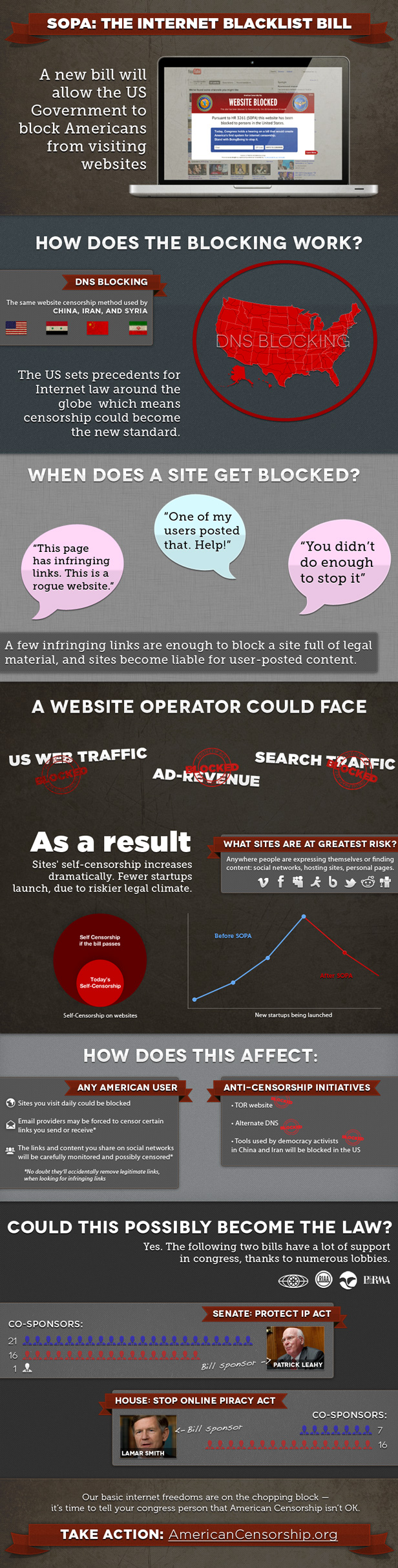
For those of you interested in censorship and copyright infringement you may want to follow what is going on in the United States with the SOPA Act (Stop Online Piracy Act). The infographic below explains it better than I could. Also this video on the Protect IP Act.
I grabbed this SOPA infographic from a WebProNews post.
GTA Tips & Tricks: PowerPoint Presentations & Wondershare – Embedding YouTube Videos versus Inserting as Files
If you want to get fancy and use YouTube videos in your PowerPoint (PP) presentations this is the tip for you!
Using Wondershare to download YouTube videos and then insert into PP is more advanced and might be the most useful information, so scroll down below for that section.
Embedding Videos
Embedding YouTube videos is not complex yet sometimes they fail because PP does not like the embed code.
Press Share under the video to grab the code. Check “Use old embed code.” Then press the Embed button. Copy the code in the box. Note: Don’t use the tinyURL link. These links have never worked for me in PP.
On the Insert tab in PP, click on the Video drop down menu and choose “Video from Web Site”. Paste the embed code into the box that appears. Cross your fingers and hope it works and a video appears in your PP!! Note that you will not be able to adjust start time and end time for embedded videos. Instead you need to Insert them as files. See below for a way how.
WonderShare AllMyTube
(www.wondershare.com/pro/youtube-downloader.html)
The free trial allows you to download YouTube videos as .FLV files (flash video). In YouTube if you hover over the right corner of a video a Download button will appear, once Wondershare is installed in your computer. Make sure you choose in preferences in the the AllMyTube application the folder where you want your files to be downloaded and saved.
You will need to convert the files from .FLV to either .AVI or .WMV. I’m not going to discuss file conversion in this post. There are many and often operating system specific. Search for one, install and convert the .FLV file. (Alternatively you can purchase the full WonderShare YouTube program, which has a file converter built in. I would recommend this for heavy users of PP.)
Once you have your .AVI or .WMV file make sure the filename has no special characters or quotations. PP does not like the characters and an error will pop up.
Go back to this icon on the Insert tab and choose “Video from File…” from the menu. Navigate to the file and click on Insert.
A Video Tools Menu should show up when clicked on a video in PP. Note the Crop tool on the right on the Format tab. Very useful!!!
This is the Playback tab of Video Tools. Clicking on the Trim Video icon allows you to specify the Start Time and End Time for your videos. Another very useful feature.
Ok, that’s it! Now you can elevate your PP presentations to the next level.
GTA Technology Tips & Tricks: Gliffy
Gliffy is a web-based application for creating flow charts and diagrams. I found this tool very useful in particular for LIS 533: Database Design for Information Management (IT). I also used it to make an organization chart for LIS 504: Leadership and Management Principles for Library and Information Services.
The free basic version allows you to save up to 5 documents when you create an account. You can create UML/ER diagrams, organization charts, Venn diagrams, floor plans, etc. The application allows you to export the diagrams as a jpeg or png file and print to paper or pdf. You can also share and collaborate. A great tool all around!
GTA Technology Tips & Tricks: U of A Microstore/Adobe Products
Do you know about the University of Alberta Microstore? This is the place to get student priced software and hardware.
Are you savvy with graphics and design? One of the best software deals a student can get is an Adobe Design Creative Suite Software package.
For example, the Adobe Design Premium package costs $399 with education pricing (Photoshop, Illustrator, InDesign, Acrobat X Pro, Dreamweaver, etc.). But the regular price of this package is US$1899.
To buy only Acrobat X Pro from the Microstore costs $75. Why would you buy this software? Acrobat Pro is Acrobat Reader but with a lot more functionality, such as writing sticky notes, replacing text, highlighting text, printing to PDF, inserting and deleting pages, fillable forms, OCR text recognition and security options.
But of course there are all sorts of free open source tools out there that may offer similar features if you are willing search them out!
GTA Technology Tips & Tricks: Commentary on Intellectual Freedom and the Amazon and Overdrive Deal with Libraries
This week my Tip &Tricks email is a bit different but still relates to technology. Intellectual freedom and privacy are fundamental values in our profession and according to Sarah Houghton (Librarian in Black) the new Amazon/Overdrive deal with libraries pushes the boundaries of these values.
I encourage you all to watch the video at the link below/attached and then forward on. I have also included links to less biased commentary – the announcement from Overdrive and a Library Journal article.
Fair warning…there is some swearing. Librarian in Black is really pissed!
GTA Technology Tips & Tricks: Why to Use a RSS Feed Reader?
We all have busy, busy lives. Sometimes its hard to keep up to date with current news and events, posts on your favourite blog or website, and bits of information that maybe useful to you sometime in the future. Those who know me, know that I have this obsession with technology…but the thing about technology is that it changes so rapidly…so how do I “stay in the know” about what’s going on in the world (and seem smarter than I really am)? I use a RSS (Really Simple Syndication) feed aggregator. My one stop shop for everything I care to know about that gets posted on the Internet.
My idea for this Tips email is not to talk about RSS Feed Readers per se…but to give you some ideas of what you could use one for. I personally love Google Reader because I don’t have to create another account to access my feeds and its easy to use. But you can key in “best RSS” or “best RSS Reader” in Google Search and browse for others. Alternatively, on your mobile device, go to your App Store and search for “RSS”. I’m sure you will have a wide selection of apps to choose from.
On any website you go to look for the below icon or look for the letters “RSS” somewhere on the page or even in the footer. You can click on this RSS link, then copy the web address of the page you are directed to or the RSS link that is noted and subscribe to the feed in your reader.
Examples of feeds I have subscribed to and why:
- Facebook Pages such as SLIS Social at the University of Alberta and Banana Republic to stay up to date with event announcements. (Hint: Look for the “Get Updates via RSS” link on any Facebook Page.) feed://www.facebook.com/feeds/page.php?id=202217855995&format=rss20
- A plethora of favourite author and blogging websites to keep up to date about books, book reviews and issues in bloglandia.
- LIS Blogs such as iLibrarian and Library Journal RSS Feeds on new book releases. http://www.libraryjournal.com/csp/cms/sites/LJ/info/rss.csp
- News feeds from content providers such as Huffington Post, Entertainment Weekly, Gizmodo, Lifehacker and Mashable, etc.
- The FLA Jobline blog to keep up to date with LIS jobs in Western Canada. http://jobline.fla.org/
- I subscribed to ~25 Cataloging blogs when I was taking LIS 532 Cataloging & Classification to gain a better understanding of this area of study and tosupport individual and group assignments.
- NPR (National Public Radio) for current events and book reviews. http://www.npr.org/rss/
- Conference proceedings.
- Study Hacks for study tips when I was in my first year of the MLIS program. http://calnewport.com/blog/
I try to keep up with posts but sometimes I skip reading them (e.g. if I go on vacation) using a Mark All As Read feature. There may be a feature where you can Staryour favourites to read at a later date. Also, being organizationally obsessed, I tag and organize posts I want to keep for future use into folders.
I hope you try out a RSS feed reader. Its a tool that can be used to simplify your life but beware of subscribing to too many feeds!
GTA Tips & Tricks: A Few Research/Reference Resources
ALA (RUSA) Mars Best Free Websites
The 2011 Best Free Reference Websites. Quality websites on specific topics – fun to browse and see what’s out there. It was interesting to see WikiLeaks on the list but I’m not surprised at TED.
University of Alberta LIS Subject Guide
If you have not yet discovered the Library and Information Studies Subject Guide on the University of Alberta Libraries website, I encourage you to review this resource as there are a variety of useful goodies, such as lists of LIS Databases & Journals and in depth resources on specific LIS topics.
Web of Science (see series of images below)
Not yet heard of citation mapping? Well this is a tool that can help you find related research articles by mapping references (citations) of other researchers who have cited the article. A popular arts and humanities, science and social sciences citation mapping database is called Web of Science.
Enter your search terms on the search page and press enter. Click on the link for an article of interest to you. Then click on the “Citation Map” link (note not all articles will have a citation mapping link). Choose which direction to map and click on “CREATE MAP” at the bottom right of the screen. Then have fun exploring that citation map!!! There are some other features to Web of Science and I have only described here one of its most powerful tools.
 infophile