Top 10 Tips from a Social Media Intern | Information Space


As a social media intern this summer, I discover new ways to better use various social media platforms on a daily basis. Below is a list that I’ve compiled that can be used for brands wanting to further their online engagement, individuals who want a stronger digital presence, or anyone interested in encouraging a more discussion-oriented environment on popular social media platforms. These tips guarantee to strengthen the experience for you and your fans.

10. Don’t simply re-post something interesting.
9. Don’t just post about a success.
8. Respond with more than a ‘thank you’.
7. Post different content on each platform.
6. Be consistent with topics.
5. Write as a peer rather than as an authority.
4. Use LinkedIn at least once a day.
3. Have a real sense of humor.
2. Asking for followers or likes will guarantee the opposite.
1. The golden rule: Do NOT use tragedy for promotion.

For the full article see: Top 10 Tips from a Social Media Intern  | Information Space.

These are really great tips. I think tips 7. and 10. are the most challenging but can have the most impact.

U Can Now Find Me on Twitter


Had been thinking for awhile now about signing up for Twitter after holding out for years. Managing your online presence is time-consuming, hours can slip by unnoticed so quickly. Not having a Twitter account was all about time management for me. I’m not an advocate of participating in every new trend or service available either. You need to focus on the social media tools that will work best for you/your business, depending on your purpose, skill level and the amount of time you are prepared to invest in promoting yourself/your business online.

More and more though, with having a blog and following LIS and tech news, it seemed very “un-modernmlis” not to have a Twitter account. Also, @HillaryClinton inspired me. You can now find me on Twitter (nic @themodernmlis).

You may also like:

11 Tips to Cultivate a Strong Twitter Following | Ellyssa Kroski – OEDb.org

10 Fun Ways to Feed Your Mind this Summer | Ellyssa Kroski – OEDB.org


10 Fun Ways to Feed Your Mind this Summer | Ellyssa Kroski – OEDB.org.

These include:

  1. Learn a new language
  2. Register for a MOOC
  3. Watch Videos from Recent Conferences
  4. Create an Awesome Summer Reading List
  5. Play an Educational Game
  6. Learn how to play an instrument
  7. Listen to Some Smart Podcasts
  8. Download Free Audiobooks
  9. Install Educational Apps on Your Tablet
  10. Read Free eBooks

See the article for the full discussion.

Wikipedia’s ‘Nearby’ Feature Pulls Up Articles Related to Your Location | Mashable


Currently, the page is designed to pull up articles that lack images, and invites users to “illustrate” articles, which they can do via their mobile device. 

Although Nearby was built for mobile, it can also accommodate Wikipedia’s desktop version.

via Wikipedia’s ‘Nearby’ Feature Pulls Up Articles Related to Your Location | Mashable

Wikipedia Nearby

The Evolution of Search in Relation to SEO | Tom Anthony


I pulled this presentation from: The Evolution of Search in Relation to SEO…05.28.13 | The Proverbial Lone Wolf Librarian’s Weblog.

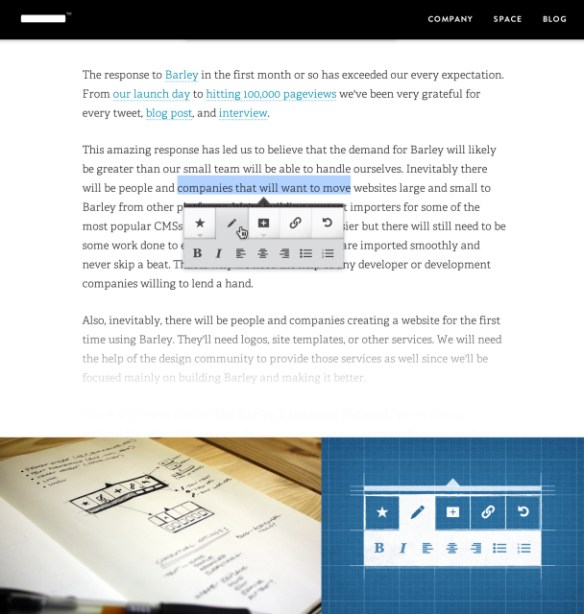
Barley Aims To Be The Absolute Simplest Way To Create And Edit Websites | TechCrunch


With Barley you just edit everything directly, just as if you were working with a document. And by using one of Barley’s templates, you don’t have to deal with layout at all. Pricing is based on traffic and starts at $18 per month. 

Currently, Barley is in beta and participation is invite only. “Save your spot” at getbarley.com.

via Barley Aims To Be The Absolute Simplest Way To Create And Edit Websites | TechCrunch.

Barlet

Create Your Own Magazines with Flipboard | Screencast Tutorial – The Digital Shift


Now anyone can create a beautiful digital zine of customized content, thanks to Flipboard. In a highly touted new feature, version 2.0 of the iconic newsstand app allows users to tap and select articles, photos, and video they find on Flipboard to create magazines on any interest or topic.

via Create Your Own Magazines with Flipboard | Screencast Tutorial – The Digital Shift, April 23, 2013

See also:

Flipboard update turns readers into magazine publishers | CNET

7 Responsive Design Tips to Revamp Your Workflow | Mashable


7 Responsive Design Tips to Revamp Your Workflow | Mashable

Tips discussed include:

  1. Mobile First
  2. Content Strategy
  3. Sketch and Prototype
  4. Frameworks
  5. Breakpoints
  6. Scalable Images
  7. Minification

There is a bonus highlighting 20 Stunning Responsive WordPress Themes.

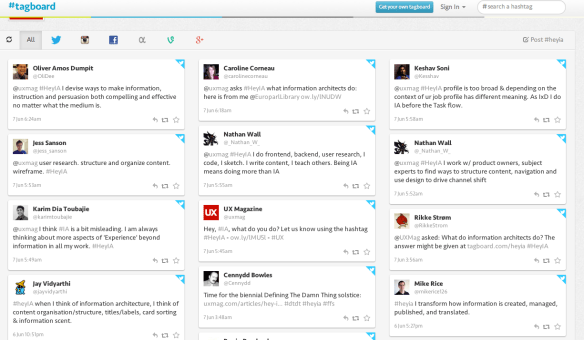
UX Magazine | Hey, information architect, what do you do? – #heyia on Tagboard


UX Magazine | Hey, Information Architect, what do you do? – #heyia on Tagboard

#heyia on Tagboard


23 Mobile Things: Join the Australian / New Zealand Course « Tame The Web


23 Mobile Things: Join the Australian / New Zealand Course « Tame The Web

Excerpt below from Tame the Web | http://tametheweb.com/2013/05/01/23-mobile-things-join-the-australian-new-zealand-course/

What are the 23 Mobile Things?

  1. Twitter
  2. Taking a photo with a mobile device:  Instagram / Flickr app / Snapchat
  3. eMail on the move
  4. Maps and checking in: Foursquare
  5. Photos + Maps + Apps: Historypin / What was there / Sepia Town
  6. Video: YouTube and screencasts
  7. Communicate: Skype / Google Hangout
  8. Calendar
  9. QR codes
  10. Social reading: RSS / Flipboard / Feedly / Goodreads / Pocket
  11. Augmented reality: Layar
  12. Games: Angry Birds / Wordfeud
  13. Online identity: FaceBook and LinkedIn
  14. Curating: Pinterest / Scoop.it / Tumblr
  15. Adobe ID
  16. eBooks and eBook apps: Project Gutenberg / Kindle / Overdrive / Bluefire / Kobo, etc.
  17. Evernote and Zotero
  18. Productivity tools: Doodle / Remember the Milk / Hackpad / any.do /  30/30
  19. File sharing: Dropbox
  20. Music: last.fm / Spotify
  21. Voice interaction and recording
  22. eResources vendor apps
  23. Digital storytelling

You can view the 23 Mobile Things on the official blog here –http://23mobilethings.net/wpress/the-things/

What is this NZ/Australian cohort all about?
simple; it is just establishing a group of librarians in NZ and Australia who are keen to do the 23 Mobile Things at the same time. This cohort will give us mutual support and contact with each other so that we can learn together and keep each other motivated. Hopefully it will help you grow your own personal learning network (PLN) and have fun and great collaborations throughout the course!