This Sign Language Ring Translates Hand Movements Into Spoken Words | Fast Company


This Sign Language Ring Translates Hand Movements Into Spoken Words | Fast Company | Business + Innovation

A winner of the coveted red dot awards for design concept in 2013, Sign Language Ring is a device that detects sign language motion and “translates” that to voice by emitting audio through a speaker.

Comprising a bracelet and set of detachable rings worn on select fingers, Sign Language Ring was inspired by Buddhist prayer beads, according to its six designers from Asia University. The wearable device can also translate voice to text, transcribing spoken language picked up by a microphone into text that’s displayed on the bracelet’s screen.

Read: This Sign Language Ring Translates Hand Movements Into Spoken Words | Fast Company | Business + Innovation

Chris Downey: Design with the blind in mind | TED.com


What would a city designed for the blind be like? Chris Downey is an architect who went suddenly blind in 2008; he contrasts life in his beloved San Francisco before and after — and shows how the thoughtful designs that enhance his life now might actually make everyone’s life better, sighted or not.

via Chris Downey: Design with the blind in mind | Video on TED.com.

Have Your Mac Read A Book To You In Mavericks And iBooks [OS X Tips] | Cult of Mac


Full Post

Have Your Mac Read A Book To You In Mavericks And iBooks [OS X Tips] | Cult of Mac

For those of you who might want to listen to a book via iBooks, one option is to load an iBook on your iPhone or iPad and turn on VoiceOver.

That can change the way your iOS device works, though, so it can be tricky to the uninitiated.

Now that iBooks is on Mavericks, however, you have another option: get your Mac to read your iBook to you.

If you’ve upgraded to Mavericks (and you should, it’s free and optimized for older machines), you have a copy of iBooks on your Mac. Launch it with a double click to the iBooks icon in the Dock or the Applications folder, and then double click one of your iBooks to open it.

Click your mouse in front of where you’d like your MAc to start reading to you, and then head up to the Edit menu. Select the Speech option in the menu, and then choose “Start Speaking.” Your Mac will read to you in the voice that’s chosen in the System Preferences Dictation & Speech preference pane.

Your Mac will keep reading the book until you choose Stop Speaking in the same Edit > Speech menu, though it won’t turn pages when it gets to a new page. If you want to follow along while it reads (a great option for folks with print or other reading disabilities), you’ll need to click the arrow keys or swipe along your trackpad as you go.

If you just want to have your Mac read a selection of text to you, simply click and drag to highlight that section, and then choose Start Speaking from the Edit menu, or right-click and choose Start Speaking from the More option in the contextual menu.

via Have Your Mac Read A Book To You In Mavericks And iBooks [OS X Tips] | Cult of Mac.

I wonder what it’s like to be dyslexic by Sam Barclay [Kickstarter Project] | Kickstarter UK


This would be a great addition to any library’s collection on disabilities. 

A beautiful, design led experience of what it feels like to struggle with reading. See more about the project: I wonder what it’s like to be dyslexic by Sam Barclay | Kickstarter.

E-readers ‘more effective’ for some dyslexic readers | BBC News


Short lines of text on electronic devices may help some dyslexic readers increase their reading speed and comprehension, research suggests.

Read the full story:  E-readers ‘more effective’ for some dyslexic readers | BBC News.

10 Ingenious Inventions for People With Disabilities | Mashable


10 Ingenious Inventions for People With Disabilities | Mashable

Inventions discussed:

  1. Kenguru Electric Car
  2. SMART Belt
  3. Braille Smartphone
  4. Lucy 4 Keyboard
  5. Eyeborg
  6. DynaVox EyeMax
  7. Braille EDGE 40 Display
  8. iBot Stair-Climbing Wheelchair
  9. iRobot Home Robots
  10. DEKA Bionic Arm

Ron McCallum: How technology allowed me to read | TED.com


Months after he was born, in 1948, Ron McCallum became blind. In this charming, moving talk, he shows how he is able to read — and celebrates the progression of clever tools and adaptive computer technologies that make it possible. With their help, and that of generous volunteers, he’s become a lawyer, an academic, and, most of all, a voracious reader. Welcome to the blind reading revolution.

via Ron McCallum: How technology allowed me to read | Video on TED.com.

Basic Tips for Working with Patrons with Disabilities | Hack Library School


Although I’ve been interested in making libraries and archives more accessible to persons with disabilities for a while now, I’ve been spending this summer specifically working on learning more about laws, programs, and first-person perspectives on disability. While it’s a challenge to learn about what’s out there, working with patrons with disabilities doesn’t have to be complex.

See the full story: Basic Tips for Working with Patrons with Disabilities | Hack Library School.

A library is not just about books: it’s also a place for the vulnerable | Angela Clarke | Comment is free | guardian.co.uk


Read the full story at the link below. The author’s story underscores the importance of libraries not just to the average person but those with disabilities, health issues and unique needs.

A library is not just about books: it’s also a place for the vulnerable | Angela Clarke | Comment is free | guardian.co.uk.

In April 2013 the genetic condition I suffer from, Ehlers Danlos type III, rendered me immobile. Unable to type, read, watch television, or work, I quickly exhausted my dwindling freelance earnings on spoken word stories. After several weeks of intensive physiotherapy I was allowed to add a gentle stroll to my day. Bored, in pain and lonely, I headed back to the library.

When I saw the aisles full of spoken word CDs, I nearly wept. The man at the information desk assured me I could also order any specific disc I wanted. Having been trapped in my home with little human interaction, chatting with staff about the books was a balm. Embarrassingly, I had to ask how to use the electronic checking-out system. I then had to be issued with a new library card: my original, solidarity-inspired one had never been activated. Shakespeare’s words rang through my head: “O, I have ta’en Too little care of this!’ But the library and its team weren’t concerned by my absence. There was no judgment. I was always welcome.

A Beautifully Simple Comic Book for the Blind | Wired Design | Wired.com


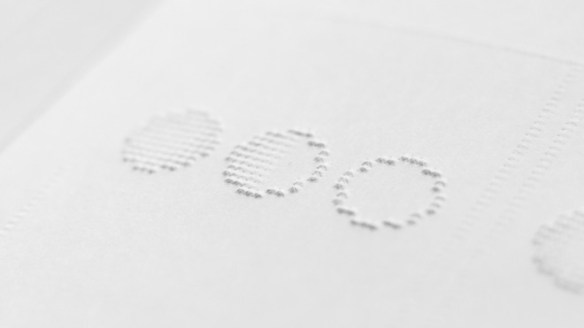
Braille has come a long way since its invention in the 19th century, but it’s still tough to apply it to the highly-visual storytelling we see in comics. This realization led Phillipp Meyer, a Copenhagen-based interaction designer, to create the first comic for the blind.

Simple, recognizable shapes paired with a contextual title and a simple narrative flow was enough for readers to glean a basic understanding of a story. From there, the reader’s imagination is in charge.

For the full story see: A Beautifully Simple Comic Book for the Blind | Wired Design | Wired.com.

Braille Comic