Make Instant Calculations and Conversions in Your Browser’s Search Bar | LifeHacker


Perform these calculations and conversions right in your browser’s search field—without ever having to hit enter for the results.

The secret sauce is Google’s predictive search technology, which suggests search results as you type. You’ll need to have Google as your main search engine and its suggestions enabled in your browser of choice (whether that’s Chrome, Firefox, IE, or Safari).

via Make Instant Calculations and Conversions in Your Browser’s Search Bar  | LifeHacker


Facebook Finally Gets Hashtag Support | Mashable


Facebook Finally Gets Hashtag Support | Mashable

According to the Facebook announcement, users will be able to:

  • Search for a specific hashtag from your search bar. For example, #NBAFinals.
  • Click on hashtags that originate on other services, such as Instagram.
  • Compose posts directly from the hashtag feed and search results.

Facebook Finally Gets Hashtag Support

Use Wolfram Alpha to Convert Obscure Technical Measurements Into Layman’s Terms | LifeHacker


Use Wolfram Alpha to Convert Obscure Technical Measurements Into Layman’s Terms | LifeHacker

Wolfram Alpha

23 Mobile Things: Join the Australian / New Zealand Course « Tame The Web


23 Mobile Things: Join the Australian / New Zealand Course « Tame The Web

Excerpt below from Tame the Web | http://tametheweb.com/2013/05/01/23-mobile-things-join-the-australian-new-zealand-course/

What are the 23 Mobile Things?

  1. Twitter
  2. Taking a photo with a mobile device:  Instagram / Flickr app / Snapchat
  3. eMail on the move
  4. Maps and checking in: Foursquare
  5. Photos + Maps + Apps: Historypin / What was there / Sepia Town
  6. Video: YouTube and screencasts
  7. Communicate: Skype / Google Hangout
  8. Calendar
  9. QR codes
  10. Social reading: RSS / Flipboard / Feedly / Goodreads / Pocket
  11. Augmented reality: Layar
  12. Games: Angry Birds / Wordfeud
  13. Online identity: FaceBook and LinkedIn
  14. Curating: Pinterest / Scoop.it / Tumblr
  15. Adobe ID
  16. eBooks and eBook apps: Project Gutenberg / Kindle / Overdrive / Bluefire / Kobo, etc.
  17. Evernote and Zotero
  18. Productivity tools: Doodle / Remember the Milk / Hackpad / any.do /  30/30
  19. File sharing: Dropbox
  20. Music: last.fm / Spotify
  21. Voice interaction and recording
  22. eResources vendor apps
  23. Digital storytelling

You can view the 23 Mobile Things on the official blog here –http://23mobilethings.net/wpress/the-things/

What is this NZ/Australian cohort all about?
simple; it is just establishing a group of librarians in NZ and Australia who are keen to do the 23 Mobile Things at the same time. This cohort will give us mutual support and contact with each other so that we can learn together and keep each other motivated. Hopefully it will help you grow your own personal learning network (PLN) and have fun and great collaborations throughout the course!

The Declassification Engine: Your One-Stop Shop for Government Secrets | Wired Enterprise | Wired.com


A fascinating article about researchers developing the “Declassification Engine” – a tool to analyze declassified documents in the United States.

In many cases, documents are declassified only because individuals will request them under the Freedom of Information Act, and this often means they’re spread to the four winds. “There are a lot of declassified documents out there. Some of them are in historians’ basements. Some are in specific libraries. Some are in digital archives. And they’re in different formats. No one has systematically collected them into a searchable, usable, user-friendly database,” says Columbia law professor David Pozen.

The Declassification Engine seeks to remedy this, but that’s only the first step. Columbia’s Matthew Connelly first dreamed up the idea when he realized that although more and more government documents are now created in electronic format, a dwindling percentage are declassified in electronic format. The rise of digital records, he told himself, should provide more opportunities for researchers, not less.

See the full article: The Declassification Engine: Your One-Stop Shop for Government Secrets | Wired Enterprise | Wired.com.


25 Alternatives to Google Analytics – Stephen’s Lighthouse


For the full article see 25 Alternatives to Google Analytics – Stephen’s Lighthouse.

25 Alternatives to Google Analytics

How to Create a Social Media Posting Hub with HootSuite | OEDB.org


Instead of visiting every social network every day and posting separate status updates, why not set up a social media hub where you can access your customized dashboard and monitor and post to them all at once?

via How to Create a Social Media Posting Hub with HootSuite | OEDB.org

HootSuite

The Best PowerPoint Alternatives for Creating Great Presentations | The Digital Shift


The Best PowerPoint Alternatives for Creating Great Presentations | The Digital Shift

You may also like:

How Can I Make My PowerPoint Presentations Amazing? | LifeHacker

Detailed Guide for Download: How To Successfully Produce A Professional Grade Webinar, Webcast, or Teleconference | Jeremiah Owyang


Master the Ten P’s, and notice that steps one through seven are actually before the actual webinar performance. The Ten Ps include: 1) Philosophy, 2) Purpose, 3) Planning, 4) Professionals, 5) Programming of Content, 6) Promotion, 7) Preparation and Practice, 8) Performance “Showtime”, 9) Pursuit, 10) Post Mortem via Detailed Guide for Download: How To Successfully Produce A Professional Grade Webinar, Webcast, or Teleconference (The Ten P’s) | Web Strategy by Jeremiah Owyang | Social Media, Web Marketing.

Webinar Guide

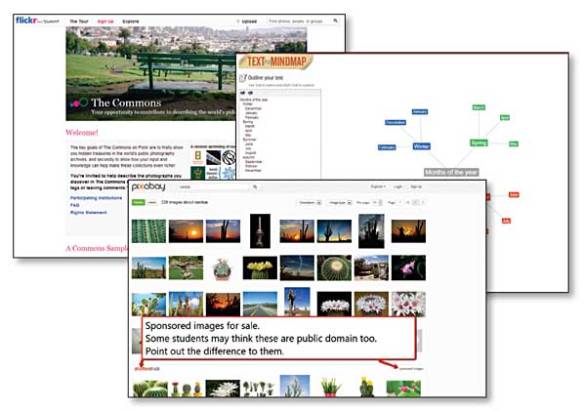
Five Best Mind Mapping Tools | Lifehacker


Mind mapping is a great way to brainstorm, make a plan, or turn ideas into the steps needed to make it real. Thankfully, there are great tools out there to help you build mind maps, organize them, and save them for later via Five Best Mind Mapping Tools | Lifehacker.