How to Create Your Own Infographics « librarianlifestyle


How to Create Your Own Infographics « librarianlifestyle.

GTA Technology Topics, Tips and Tricks: Links to Tools & Resources


Here are some lovely links to a variety of tools and resources!
 
 
11 Web-Based Polling and Survey Tools from Free Technology for Teachers
 
 
EDUCAUSE has links to hundreds of informational resources browsable by topic (e.g. information systems and services, libraries and technology, teaching and learning, etc.) or resource type (i.e. presentations, blogs, podcasts, publications).


GTA Technology Topics, Tips and Tricks: Online Privacy


I’ve seen the commentary on online privacy intensify the past few months. Facebook routinely changes its privacy policy it seems and Google has moved to one privacy policy for all of its applications. I think its good we hear about the privacy infractions by companies in the news, such as when the Sony database was hacked into and personal data was stolen from users. It really concerns me though about all the intrusions and privacy breaches that are not disclosed. Organizations need to start being more accountable for the client data they are charged with protecting and we need to start expecting more from the organizations we provide our personal information to. Users need to arm themselves to protect their information and identity, so its important to create awareness and give users tools to protect themselves. In that spirit here are some useful and informative links on online privacy.
 
The Sad State of Social Media Privacy Article & Infographic from Marketing Tech Blog/MDG Advertising.com
 
 
The Electronic Frontier Foundation proposed in 2010 a Bill of Privacy Rights for Social Network Users. They again built on this theme by creating A Mobile User Privacy Bill of Rights earlier this month.
 
 
The iLibrarian has a great post on this very topic which I am including below:
 
Social media and online privacy are always a concern, but more so in recent times with variable and ever-changing privacy policies. Here are five stories from the last couple of weeks covering online privacy:

Are You In Control of Your Social Media Privacy? [INFOGRAPHIC]
Stephanie Buck at Mashable blogs about a recent infographic titled Social Media Management: Protect Your Privacy created by ZoneAlarm, based on a 2012 study by Pew

Do You Value Your Internet Privacy?
Alicia Eler at ReadWriteWeb takes a look at a recent study released by the European Network and Information Security Agency (ENISA) in which researchers investigated whether or not customers of online services would pay a mark-up to an online service provider who protected their information better.

Social Media Privacy: 3 Questions to Ask Before Authorizing Third-Party Apps
Jamie Beckland at Mashable talks about how best to insure your privacy on social sites and whether it’s a good idea to authorize outside apps to access your information.

Internet privacy a growing concern, Pew finds
Benny Evangelista, SFGate dicusses privacy with regard to search engines and whether or not people’s search histories are being tracked.

How Do We Explain Patron Privacy in a World of Target Markets?
Laura Crossett writes an insightful article about privacy and library patrons.

11 Web-based Polling and Survey Tools


Free Technology for Teachers: 11 Web-based Polling and Survey Tools.

GTA Technology Topics, Tips and Tricks: Timeline Tools


I was asked whether I knew of any good timeline maker tools and I actually have never used one before. I did some investigating into what is available and am passing along the tools I found.
 
This article by makeuseof looks at two easy to use tools Tiki-Toki and Dipity.
 
Tiki-Toki – Looks impressive but basic/free account has restrictions.
 
Dipity – More basic than Tiki-Toki but may not work well for print purposes. Looks great for web purposes and sharing.
 

TimeRime – Create, view, share and compare timelines. Basic account probably has some restrictions.

 
TimeGlider – This one looks more advanced and again may not work well for print purposes. Application moving away from Flash and will use a Javascript plugin. Complicated installation.
 
Timeline – This one is cross platform, free and open source. Requires installation. May be the best to use for print purposes. Mac OSX users may have to install from the command line.
 
Another option is to install a PowerPoint plugin from Office Timeline. This looks like the best option for print purposes.
 

GTA Technology Topics, Tips and Tricks: Pinterest


As an update to my prior post on Social Bookmarking, this post is dedicated to the new hot social media trend Pinterest (though it has been around since 2008).
 
Pinterest is a website of virtual inboards. From an LIS perspective, users “catalog” items and create visual collections by topic/interest/category.
 
Some may argue its an advertising tool to sell things and promote brands…I think Pinterest is a great tool to see what’s trending and popular.
 
Pinterest may have useful applications for libraries as discussed in these posts by the iLibrarian “5 Ways to Use Pinterest in Your Library” and “5 More Ways to Use Pinterest in You Library“.
 
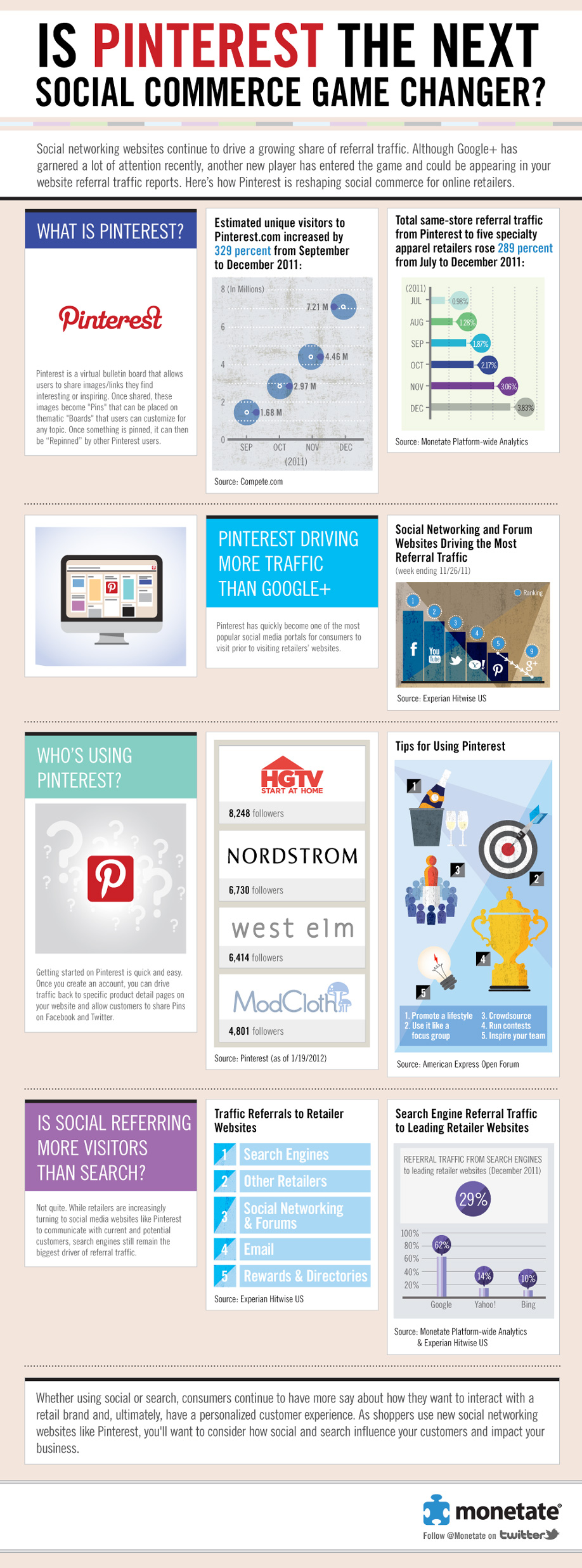
Here’s an infographic for some Pinterest stats…one of which is that 97% of Pinterest’s Facebook fans are women! Apparently Pinterest has no revenue business model right now and is focused on growing the service.
 

Another Infographic: Is Pinterest The Next Social Commerce Game Changer?


GTA Technology Topics, Tips & Tricks: Social Bookmarking & Recommender Sites


Here are some great websites to take a look at for social bookmarking (excluding Twitter and related web applications). Social bookmarking tools can be used to find recommendations, what is popular, share what you love, and find further information on a topic. This recent article by eBizMBA lists the top 15 of February 2012. The hottest social bookmarking website right now is Pinterest. It does look pretty cool.  I wish I had the time to use all these social bookmarking tools!
 
Pinterest – “Pinterest lets you organize and share all the beautiful things you find on the web. People use pinboards to plan their weddings, decorate their homes, and organize their favorite recipes.”  I love how visually-based this website is! With such cool pin boards as “Plan a Wedding” or “Save your inspirations.”
 
Reddit – “The front page of the Internet.” Lists links and ranks the most popular websites on the Internet and websites that are trending. 
 
Delicious – “Delicious helps you find cool stuff and collect it for easy sharing. Dig into stacks created by the community, and then build your own!” 
 
Digg – “Digg is a place for people to discover and share content from anywhere on the web. From the biggest online destinations to the most obscure blog, Digg surfaces the best stuff as voted on by our community.”
 
StumbleUpon – “We help you explore new and interesting things from every corner of the Web.”  You tell StumbleUpon what you like and it will recommend web pages, videos, photos and more that “you wouldn’t have found on your own.”
 
GetGlue – “GetGlue is a social network for entertainment. Users check-in and share what they are watching, listening to and reading with friends; get fresh recommendations, exclusive stickers, discounts and other rewards from their favorite shows and movies.”
 

GTA Technology Topics, Tips & Tricks: Tools to Help Support Learning & Organization


Here are some great tools to think about using to help you learn and organize! There is of course the Google Apps suite but the recommendations posted below are out of the box type of tools!
Quizlets Flashcards help you study for final exams, languages, vocabulary, etc. and they can be shared. Web-based. (Free)
Index Card for Apple iPad lets you write index cards. Useful for those non-linear thinkers! ($4.99)
inClass for Apple iPad and iPhone is basically a digital planner, allowing you to store multimedia notes and organize your schedule (free)
Evernote for PC and Mac OS X. Amazing tool where you can tag notes and save web clips, text documents, pdfs, etc. Can be used in every aspect of your life and I think its a great tool for saving and organizing recipes. Their tagline is “Remember Everything” and there is a browser plug-in. Syncs across devices. (free)
iProcrastinate for Mac OS X and iPhone. Sync calendars, tasks and to do lists. You can break down tasks into components. (free)
bubbl.us is a brainstorming tool. Web-based. (free)
Diigo lets you bookmark, highlight and sticky note (annotate web) pages. Web-based and all platforms. (try for free = limited features)

GTA Technology Topics, Tips & Tricks: Protopage


I hope you all had a wonderful Christmas! I would like to recommend to you a free tool called Protopage, which allows you to create your own personal Internet landing/home page using mashups of widgets. Think of it as similar to Google Chrome. Protopage has the added feature of multiple tabs of mashups though.
 
mashup = “A Web page or application that uses and combines data, presentation or functionality from two or more sources to create new services.” (Wikipedia)
widget = “In computing a web widget is a software widget for the web.” (Wikipedia)
 
You can add widgets such as web links, clocks, bookmarks, maps, etc. There are thousands of sources for widgets and you can personalize colours and themes. I think this is a great tool for those of us who like to access information all in one place.
 

GTA Technology Topics, Tips & Tricks: Citation Management with Zotero


Ok so my recommendation of this tool comes from word of mouth and not personal experience, as I have never used it. But I have used RefWorks and I don’t bother with it anymore because its always hit and miss importing citations from databases. I have heard good things about Zotero though!
 
I would recommend its use for students who have to manage citations from a lot of different resources (databases, web pages, images, digital objects, etc.) or for those students who are involved in large research projects, directed studies, theses, etc.

 
Zotero is free. The program uses an Internet Plug-in for importing citations.
 
The original Zotero works only in Firefox. Zotero 3.0 beta version works on all operating systems, on any browser. Download either version at the link below.
 
Here is a discussion of Zotero 3.0, the beta version, from Dean Giustini of The Search Principle blog (UBC prof).
http://blogs.ubc.ca/dean/2011/08/here-comes-zotero-3-0-beta-for-a-new-term/

 
Here is a Beginner’s Guide to Zotero SlideShare presentation.
 
Here are screencast tutorials.
 
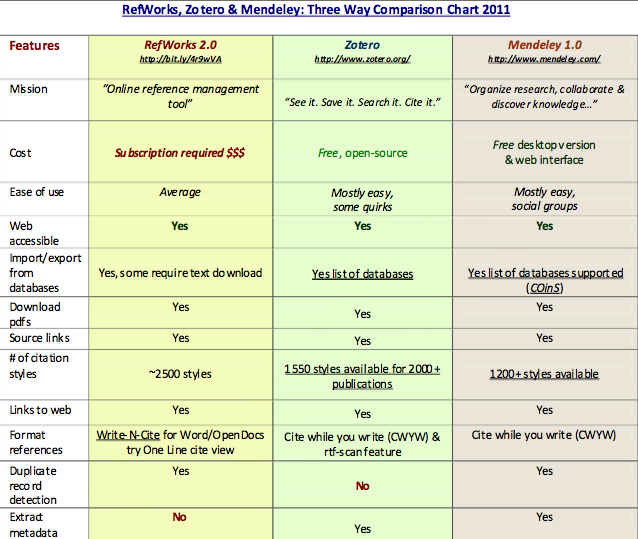
Comparison of RefWorks/Zotero/Mendeley from The Search Principle.