30 Things You No Longer Need Because of Smartphones | BuzzFeedVideo


The Book as App: Multi-Touch Ebooks and Their Future in Libraries | Nicole Hennig


This Sign Language Ring Translates Hand Movements Into Spoken Words | Fast Company


This Sign Language Ring Translates Hand Movements Into Spoken Words | Fast Company | Business + Innovation

A winner of the coveted red dot awards for design concept in 2013, Sign Language Ring is a device that detects sign language motion and “translates” that to voice by emitting audio through a speaker.

Comprising a bracelet and set of detachable rings worn on select fingers, Sign Language Ring was inspired by Buddhist prayer beads, according to its six designers from Asia University. The wearable device can also translate voice to text, transcribing spoken language picked up by a microphone into text that’s displayed on the bracelet’s screen.

Read: This Sign Language Ring Translates Hand Movements Into Spoken Words | Fast Company | Business + Innovation

News: Books & Publishing, Music & Film


Books & Publishing

Amazon

Music & Film

What Teens, Screens and Digitally Divided Attention Spans Mean for Learning [Infographic] | The LAMP


What Teens, Screens and Digitally Divided Attention Spans Mean for Learning

What Teens, Screens and Digitally Divided Attention Spans Mean for Learning [Infographic] | The LAMP

Classrooms Go High-Tech With Google Play for Education | PCMag.com


Google is making it more convenient for schools around the country to integrate tablets and educational apps into the classroom.

The search giant on Wednesday officially launched tablets running Google Play for Education, a version of the Google Play app store specifically designed for K-12 schools in the U.S.

Read: Classrooms Go High-Tech With Google Play for Education | News & Opinion | PCMag.com.

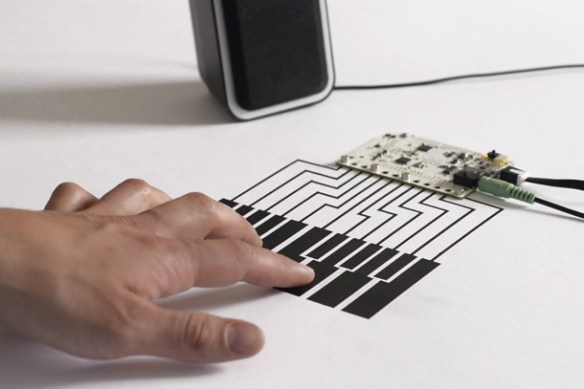
Touch Board kit combines an Arduino heart with touch sensors, conductive paint | Engadget


Capacitive sensing isn’t limited to your smartphone. In fact, you can use contact with human skin (or any other conductive surface) to trigger almost any circuit. And the Touch Board from Bare Conductive wants you to combine your DIY spirit with the ability to turn practically any surface into a sensor. At the heart is an Arduino compatible microcontroller (based on the Leonardo) with a few extras baked in, including a Freescale touch sensor connected to 12 electrodes and an audio processor for triggering MIDI sounds or MP3 files. While you can simply trigger the electrodes by touching them or connecting them to any conductive material, such as a wire, the Electric Paint Pen really opens up the input possibilities. It’s just like a paint marker, often used for small scale graffiti, except it spits out conductive black ink that can turn a wall, a piece of paper or almost anything else into a trigger. In fact, it

TouchBoard

‘s preloaded with a bunch of sample sounds on a microSD card so that you can simply paint a soundboard out of the box.

Read more: Touch Board kit combines an Arduino heart with touch sensors, conductive paint.

Have Your Mac Read A Book To You In Mavericks And iBooks [OS X Tips] | Cult of Mac


Full Post

Have Your Mac Read A Book To You In Mavericks And iBooks [OS X Tips] | Cult of Mac

For those of you who might want to listen to a book via iBooks, one option is to load an iBook on your iPhone or iPad and turn on VoiceOver.

That can change the way your iOS device works, though, so it can be tricky to the uninitiated.

Now that iBooks is on Mavericks, however, you have another option: get your Mac to read your iBook to you.

If you’ve upgraded to Mavericks (and you should, it’s free and optimized for older machines), you have a copy of iBooks on your Mac. Launch it with a double click to the iBooks icon in the Dock or the Applications folder, and then double click one of your iBooks to open it.

Click your mouse in front of where you’d like your MAc to start reading to you, and then head up to the Edit menu. Select the Speech option in the menu, and then choose “Start Speaking.” Your Mac will read to you in the voice that’s chosen in the System Preferences Dictation & Speech preference pane.

Your Mac will keep reading the book until you choose Stop Speaking in the same Edit > Speech menu, though it won’t turn pages when it gets to a new page. If you want to follow along while it reads (a great option for folks with print or other reading disabilities), you’ll need to click the arrow keys or swipe along your trackpad as you go.

If you just want to have your Mac read a selection of text to you, simply click and drag to highlight that section, and then choose Start Speaking from the Edit menu, or right-click and choose Start Speaking from the More option in the contextual menu.

via Have Your Mac Read A Book To You In Mavericks And iBooks [OS X Tips] | Cult of Mac.

Networked Worlds & Networked Enterprises | Pew Research Center


Networked Worlds & Networked Enterprises
Lee Rainie, Director of the Pew Research Center’s Internet Project, shows how the large, loosely knit social circles of networked individuals expand opportunities for learning, problem solving, decision making, and personal interaction.

The new social operating system of “networked individualism” requires us to develop networking skills and strategies, work on maintaining ties, and balance multiple overlapping networks. The “triple revolution” that has brought on this transformation: the rise of social networking, the capacity of the Internet to empower individuals, and the always-on connectivity of mobile devices.

Drawing on extensive evidence, Rainie examines how the move to networked individualism has driven changes in organizational structure, job performance criteria, and the way people interact in workplaces. He presents a glimpse of the new networked enterprise and way of working.


8 Apps to Make You a Better Reader | Mashable


How many books did you read last year? If your answer is more than one, congratulations: you’re more well-read than about 25% of Americans over age 16, according to a 2012 Pew Internet survey.

Ironically, as we become more surrounded by words in the digital age, less of us are finding time to actually read them. The good news is that your smartphone or tablet can help.

Trying to stray from the obvious reading apps, like e-readers, we’ve gathered eight excellent apps that’ll help you improve your reading ability and become a better literary citizen, while simultaneously boosting your brain function.

Whether you’d like to read more, faster or some combination of the two, these apps will light your path to wisdom.

Includes overviews of the following apps:

  1. Instapaper
  2. Syllable
  3. Dictionary.com
  4. Readmill
  5. Goodreads
  6. Longform app for iPad
  7. Lumosity
  8. Audible

Read: 8 Apps to Make You a Better Reader | Mashable.