The Next Big Thing In Responsive Design | Co.Design


The Next Big Thing In Responsive Design | Co.Design | business + design

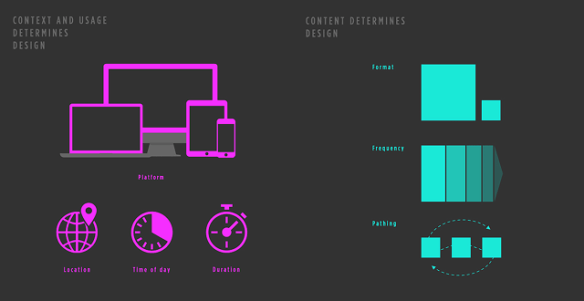
Responsive design, which allows designers and developers to build websites that adapt to every screen size, is one of the most empowering web tools to be adopted in the last decade.

But adapting to the screen is only the first frontier of a new, responsive web. Today, users expect online experiences that not only respond to what device theyre using, but also their location, time of day, what they’ve already read, and events happening in real time.

To capture a user’s attention for the next generation of the web, you’ll need more than just responsive design. You’ll need a responsive philosophy.

READ MORE: The Next Big Thing In Responsive Design | Co.Design | business + design.

Reuters | New KNFB smartphone app gives sight to the blind | KurzweilAI


The National Federation of the Blind, the nation’s leading advocate for access to print by the blind, has applauded the release of KNFB Reader, a new app for the iPhone and other Apple iOS devices, which uses the phone’s camera and state of the art optical character recognition (OCR) technology to give the blind instant access to the contents of print materials.

Members of the National Federation of the Blind have worked with KNFB Reading Technology, which developed the app along with Sensotec, KNFB Reader is now available in the Apple iTunes app store.

READ MORE: Reuters | New KNFB smartphone app gives sight to the blind | KurzweilAI.

9 Fashionable Wearables for the Sartorially Savvy | Mashable


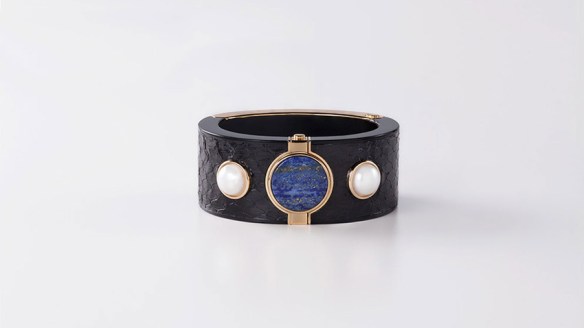
The fashion world wants to get functional. Smart, wearable technology has always had a bit of an image problem. Google Glass, Fitbit and other popular tech companies have found it difficult to add a sartorial touch to smart gear. Jamming an ugly smartwatch onto a chic outfit has always been the curse of those who sit at the crossroad between taste and technology. But the designer world is here to help. Thanks to a number of collaborations with fashion mavens such as Diane von Furstenberg and Tory Burch, stylish wristbands, smartwatches and even Google Glass are getting gorgeous upgrades. Here are nine gadgets that are actually smart and chic.

READ MORE: 9 Fashionable Wearables for the Sartorially Savvy | Mashable

Sony quietly starts selling Digital Paper E Ink tablet online [For U.S. Only] | CNET


Sonys Digital Paper E Ink e-reader/tablet hybrid has now been made available to buy, directly through the Sony website, as well as from the licensed resellers through which the tablet started being sold in May, Good E Reader has reported.

READ MORE: Sony quietly starts selling Digital Paper E Ink tablet online | CNET.

Kobo’s Aura H20 Makes The High-Res E-Reader Waterproof – Your Move, Amazon | TechCrunch


Kobo has a new e-reader out that actually could shake up the market, since it offers waterproofing as a standard factory feature on a $179.99 e-reader, with a high-res, 265 DPI 6.8-inch e-ink display. The Kobo Aura H20 basically takes the already-impressive Aura HD, makes the design thinner and lighter, and adds IP67 environmental resistance, which is a tough package to beat.

via Kobo’s Aura H20 Makes The High-Res E-Reader Waterproof – Your Move, Amazon | TechCrunch.


MIT Develops a Phone Screen That Corrects Poor Vision | WIRED


Researchers from MIT and the University of California, Berkeley have created a prototype for a new display technology that can automatically correct for vision defects. Think of it as glasses for your iPad. Or your phone, or your car dashboard or any number of screen-based devices you have in your life. The point being, someday in the not too distant future you won’t need to wear glasses anymore to do certain tasks.

READ MORE: MIT Develops a Phone Screen That Corrects Poor Vision | Design | WIRED.

This Waterproof Kindle Paperwhite Is Humanity’s Greatest Achievement | TechCrunch


Sometimes a device comes so close to being perfect that you’d be forgiven for not realizing that with just a single tweak, it can become, in actual fact, perfect. The Kindle Paperwhite is such a device, as an e-reader that Amazon has crafted so well that you pretty much never need look beyond for anything better. But while a regular book ends up with wrinkly pages after being caught in a surprise downpour on the beach, the Paperwhite fizzles – unless you get the Waterfi-treated Kindle Paperwhite.

The Waterfi version is shipped in the original Kindle packaging without any outward appearance of having been modified. It looks and feels like a Kindle, albeit a slightly heavier version, and interacting with its touchscreen is the same as you’d find with an unmodified version. But because of Waterfi’s special treatment process, its Kindle Paperwhite is completely waterproof – submersible to above 200 feet in either fresh or salt water, for any length of time.

READ MORE: This Waterproof Kindle Paperwhite Is Humanity’s Greatest Achievement | TechCrunch

9 Things You Need To Know About Teens, Technology & Online Privacy | Pew Research


Amanda Lenhart presented nine major themes from the Project’s five-report series on Teens and Online Privacy. In a talk delivered to the Family Online Safety Institute’s annual conference on November 7th, Amanda examined youth’s social media diversification and sharing practices, privacy choices, and the ways that youth concepts of privacy differ from adults.

Have Your Mac Read A Book To You In Mavericks And iBooks [OS X Tips] | Cult of Mac


Full Post

Have Your Mac Read A Book To You In Mavericks And iBooks [OS X Tips] | Cult of Mac

For those of you who might want to listen to a book via iBooks, one option is to load an iBook on your iPhone or iPad and turn on VoiceOver.

That can change the way your iOS device works, though, so it can be tricky to the uninitiated.

Now that iBooks is on Mavericks, however, you have another option: get your Mac to read your iBook to you.

If you’ve upgraded to Mavericks (and you should, it’s free and optimized for older machines), you have a copy of iBooks on your Mac. Launch it with a double click to the iBooks icon in the Dock or the Applications folder, and then double click one of your iBooks to open it.

Click your mouse in front of where you’d like your MAc to start reading to you, and then head up to the Edit menu. Select the Speech option in the menu, and then choose “Start Speaking.” Your Mac will read to you in the voice that’s chosen in the System Preferences Dictation & Speech preference pane.

Your Mac will keep reading the book until you choose Stop Speaking in the same Edit > Speech menu, though it won’t turn pages when it gets to a new page. If you want to follow along while it reads (a great option for folks with print or other reading disabilities), you’ll need to click the arrow keys or swipe along your trackpad as you go.

If you just want to have your Mac read a selection of text to you, simply click and drag to highlight that section, and then choose Start Speaking from the Edit menu, or right-click and choose Start Speaking from the More option in the contextual menu.

via Have Your Mac Read A Book To You In Mavericks And iBooks [OS X Tips] | Cult of Mac.

Tablets: the fastest growing technology in history [Infographic]| Netbiscuits


The latest infographic from Netbiscuits highlights the importance of brand awareness of the tablet platform and the vast differences between how developed and developing markets use their devices.

For brands, it is becoming increasingly important to deliver great tablet experiences to their customers. And with 46% of users admitting to defecting to competitor website after a bad tablet experience, there was never a better time for brands to begin incorporating tablets into their web strategy. 

Tablets: the fastest growing technology in history

via Tablets: the fastest growing technology in history | Netbiscuits.