The Most Important LinkedIn Page You’ve Never Seen | Wired Business | Wired.com


The Most Important LinkedIn Page You’ve Never Seen | Wired Business | Wired.com

Quotables:

“Tucked behind your professional, yet pretty, profile picture, the descriptions of all your past jobs, and that column of “People You May Know” is a section of LinkedIn that most people have never heard of, let alone seen. And yet it’s the real reason why you should actually care about sprucing up your LinkedIn profile and network.”

“If you care a whit about your career not only do you have to be on LinkedIn, you should have a detailed profile with your job history. It should look like your resume. Taking advantage of LinkedIn features like Skills can also make you more searchable to recruiters. And of course, build out your network with people you know.”

“Instead of sticking to the usual job board or paying an outside agency to find candidates, recruiters can use LinkedIn to find exactly who they want with the skills and experience they want.”

A Search Engine For The Internet Of Things | Fast Company | Business + Innovation


“A little-known search engine which indexes information on computers attached to the internet is increasingly leaving itself open to be used by hackers as fears about cyber attacks an American infrastructure and banking systems heighten.” via A Search Engine For The Internet Of Things | Fast Company | Business + Innovation.

Shodan

You may also like:

The cloud is fundamental to the Internet of Things | TechRepublic | The Modern MLIS

Collection of Links: SEO and Libraries


Libraries can leverage SEO as another avenue to investigate in confirming their importance to communities and increasing visibility of their services. Here are some useful links.

Mashable | Free Database of the Entire Web May Spawn the Next Google


Common Crawl, and subsequent spin off projects, is an organization I believe librarians should be following closely. It would be great for library and information service professionals to be involved with some of these projects. I could also see the government and educational institutions providing funding for research proposals analyzing some of the data.

“A nonprofit called Common Crawl is now using its own web crawler and making a giant copy of the web that it makes accessible to anyone. The organization offers up more than 5 billion web pages, available for free so that researchers and entrepreneurs can try things otherwise possible only for those with access to resources on the scale of Google’s.”

via Mashable | Free Database of the Entire Web May Spawn the Next Google.

13 [Web] Design Trends For 2013 | Gizmodo


Discussed:

  1. Flat Design
  2. Fewer Button (More Gestures)
  3. Animation as Affordance
  4. “Hamburger” Menu Drawer
  5. Native Over Web
  6. Responsive if not Native
  7. Wider Websites
  8. Larger Fonts
  9. Larger Search Inputs
  10. GIFs as Design Elements
  11. Designing for Humans
  12. New Colors
  13. Vector

13 Design Trends For 2013 | Gizmodo.

GTA Technology Topics, Tips and Tricks: Links to Tools & Resources


Here are some lovely links to a variety of tools and resources!
 
 
11 Web-Based Polling and Survey Tools from Free Technology for Teachers
 
 
EDUCAUSE has links to hundreds of informational resources browsable by topic (e.g. information systems and services, libraries and technology, teaching and learning, etc.) or resource type (i.e. presentations, blogs, podcasts, publications).


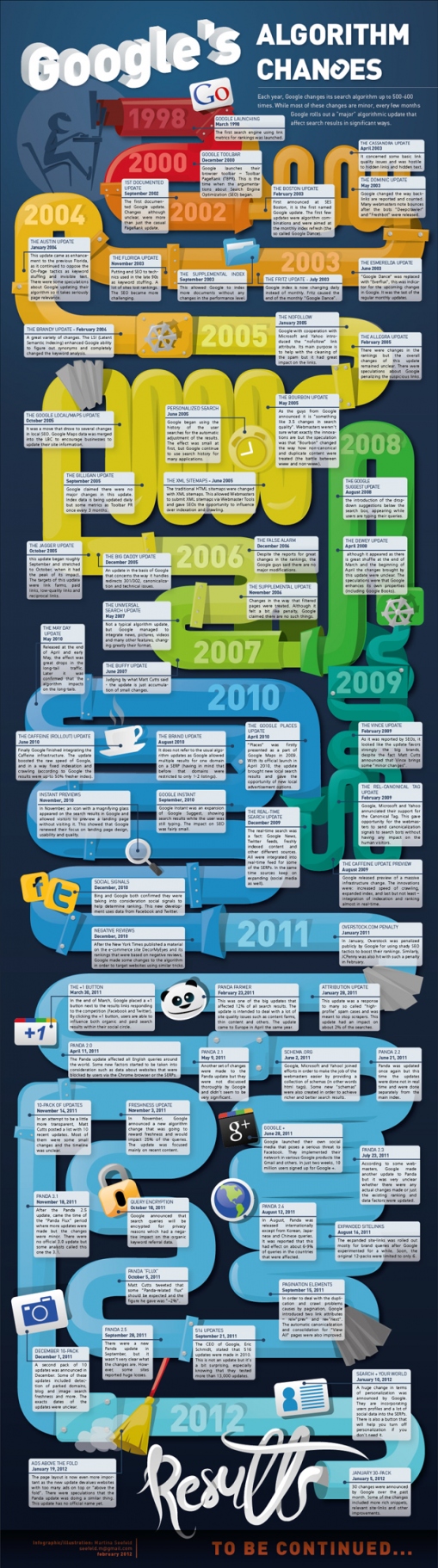
GTA Technology Topics, Tips and Tricks: Infographic Diversions – Dystopian Timeline to the Hunger Games; Wikipedia is Redefining Research; Google Algorithm Changes


Some fun infographic diversions…

GTA Technology Topics, Tips & Tricks: Google Search [You Disappoint Me]


I wanted to bring to your attention the continuing demise of the quality of Google Search. This is just not my own opinion but the opinion of some others as well, as illustrated in the articles below. So I am advising you to be more critical using Google Search for your information needs. Why am I emailing you about this? It is our responsibility, as information workers, to be critical of the resources we use for ourselves and our clients and not always assume resources relied upon for years continue to be effective.
Google Search is swinging away from a pure search algorithm (which hasn’t been that great lately anyways due to Google’s “freshening” up their algorithm), to the inclusion of social results related to the topic searched on (Google+). That’s what that +1 means at the end of some of the search results links – Google integrating Google+ results into Google Search.  The Google+ tagline is “Google+: real life sharing, rethought for the web.
“What I dislike about Search plus Your World isn’t that Google has more deeply integrated social data on its search results pages. It’s that the search engine has gone overboard with Google+ in a way that makes me feel like I’m being force-fed a new social network. It’s too much, too soon.”
June 1, 2011 – Eric Schmidt: Google wants to get so smart it can answer your questions without having to link you elsewhere [original statement of intent for the future of Google Search]
January 12, 2012 – Google’s Search Update Could Warrant an FTC Probe [due to potential inclusion of personal information from Google+ in search results]
January 13, 2012 – Google+ Search Controversy Grows
How to Turn Off Google’s Personalized Search Results [I think if you have a Google+ account, which I don’t. I tried this procedure but I had no “personalized results” option in my settings.]
Great State of Search blog post: The Unexpected Backlash of Google Plus Your World.
Obviously, I don’t approve of the new changes but I’d love to hear your comments or even a differing opinion!

GTA Technology Topics, Tips & Tricks: Google Advanced Search and Other Tips


Here is a great infographic for getting the most out of Google!