Keep an Eye on These Web Design Trends in 2013 | Mashable


Keep an Eye on These Web Design Trends in 2013 | Mashable

Trends include responsive web design, retina display, Twitter Bootstrap, content marketing, the freelance economy and development education.

Information Space | 10 Social Media Tools To Keep You Connected With The Music Scene


Information Space | 10 Social Media Tools To Keep You Connected With The Music Scene

For Librarians, a New Digital Resource on Students with Disabilities – The Digital Shift


For Librarians, a New Digital Resource on Students with Disabilities – The Digital Shift.

If You Love Documentaries…


“Documentary Heaven is a free site that has organized more than 1600 documentary films found across the Internet. Through Documentary Heaven can find documentaries covering all kinds of topics in science, history, politics, business, and many more categories. The videos are sourced from a variety of services including, but not limited to, YouTube.”

via Free Technology for Teachers: 7 Places to Find & Watch Documentaries Online.

Collection of Links: User Experience


Two of the LIS courses I took this winter were Information Architecture: Web Design for Usability and Emerging & Evolving Technologies. Both courses reviewed at some point usability and the user experience. Although one may think of websites or applications first when discussing usability and/or the user experience, the concept can be applied to any space or thing. There is a lot of choice out there for consumers – companies and organizations can improve the user experience to generate loyalty and increase brand awareness.

User Experience Is The Heart Of Any Company. How Do You Make It Top Priority? from FastCompany

Why User Experience Is Critical To Customer Relationships from FastCompany

User Experience And The Poison On The Tip Of The Arrow from TechCrunch

UX Design as a Two-Way Conversation from UX Magazine

Cognition & The Intrinsic User Experience from UX Magazine

User Experience: The Reason Apple Towers Over Sony from Gizmodo

5 Signs of a Great User Experience from ReadWriteWeb

Mashable: The Ultimate Digital Customer Service Guide


The Ultimate Digital Customer Service Guide

Some of the tips in these articles can be applied to library and information services professions, such as number eight “14 Community-Driven Tips for Better Customer Relationships.”

GTA Technology Topics, Tips and Tricks: Mixed Links on Visual/Digital Resources & Services


The Pottermore Shop is open for purchase of Harry Potter eBooks. Unfortunately it looks like the eBooks are not available in Canada yet but the digital audio books are. The eBooks are DRM free. For more details see this announcement from Publisher’s WeeklyCheckouts from OverDrive start Thursday (?US only).
 
I ran across the Ogilvy Notes from SXSW 2012. These graphics are pretty cool and visually summarize a wide range of topics such as Digital Debauchery with Anthony Bourdain, Surviving Technology and Abundance: The Future is Better Than You Think. Communication using visual imagery always seems to have more of an impact and is very effective for technology related topics.
 
Continuing with the visual imagery theme, here is a post investigating the 20 Great Ways Libraries are Using Pinterest.
 
 
The Nelson Mandela Centre of Memory Digital Archive goes live with help from Google (PCMage article).  Also, from earlier this month the Albert Einstein Archives Online is now available.
 
A post from SU Information Space commenting on why LIS students should care about the Digital Public Library of America project.
 
A new Timeline tool is now available for everyone that pulls in media from different sources such as YouTube, Twitter, flickr, etc. Here is a post from Mashable highlighting this new tool.
 
Did you know there are over 100 different tools and resources available about infographics and data visualization? Here is the list.


GTA Technology Topics, Tips and Tricks: Online Privacy


I’ve seen the commentary on online privacy intensify the past few months. Facebook routinely changes its privacy policy it seems and Google has moved to one privacy policy for all of its applications. I think its good we hear about the privacy infractions by companies in the news, such as when the Sony database was hacked into and personal data was stolen from users. It really concerns me though about all the intrusions and privacy breaches that are not disclosed. Organizations need to start being more accountable for the client data they are charged with protecting and we need to start expecting more from the organizations we provide our personal information to. Users need to arm themselves to protect their information and identity, so its important to create awareness and give users tools to protect themselves. In that spirit here are some useful and informative links on online privacy.
 
The Sad State of Social Media Privacy Article & Infographic from Marketing Tech Blog/MDG Advertising.com
 
 
The Electronic Frontier Foundation proposed in 2010 a Bill of Privacy Rights for Social Network Users. They again built on this theme by creating A Mobile User Privacy Bill of Rights earlier this month.
 
 
The iLibrarian has a great post on this very topic which I am including below:
 
Social media and online privacy are always a concern, but more so in recent times with variable and ever-changing privacy policies. Here are five stories from the last couple of weeks covering online privacy:

Are You In Control of Your Social Media Privacy? [INFOGRAPHIC]
Stephanie Buck at Mashable blogs about a recent infographic titled Social Media Management: Protect Your Privacy created by ZoneAlarm, based on a 2012 study by Pew

Do You Value Your Internet Privacy?
Alicia Eler at ReadWriteWeb takes a look at a recent study released by the European Network and Information Security Agency (ENISA) in which researchers investigated whether or not customers of online services would pay a mark-up to an online service provider who protected their information better.

Social Media Privacy: 3 Questions to Ask Before Authorizing Third-Party Apps
Jamie Beckland at Mashable talks about how best to insure your privacy on social sites and whether it’s a good idea to authorize outside apps to access your information.

Internet privacy a growing concern, Pew finds
Benny Evangelista, SFGate dicusses privacy with regard to search engines and whether or not people’s search histories are being tracked.

How Do We Explain Patron Privacy in a World of Target Markets?
Laura Crossett writes an insightful article about privacy and library patrons.

GTA Technology Topics, Tips and Tricks: Pinterest


As an update to my prior post on Social Bookmarking, this post is dedicated to the new hot social media trend Pinterest (though it has been around since 2008).
 
Pinterest is a website of virtual inboards. From an LIS perspective, users “catalog” items and create visual collections by topic/interest/category.
 
Some may argue its an advertising tool to sell things and promote brands…I think Pinterest is a great tool to see what’s trending and popular.
 
Pinterest may have useful applications for libraries as discussed in these posts by the iLibrarian “5 Ways to Use Pinterest in Your Library” and “5 More Ways to Use Pinterest in You Library“.
 
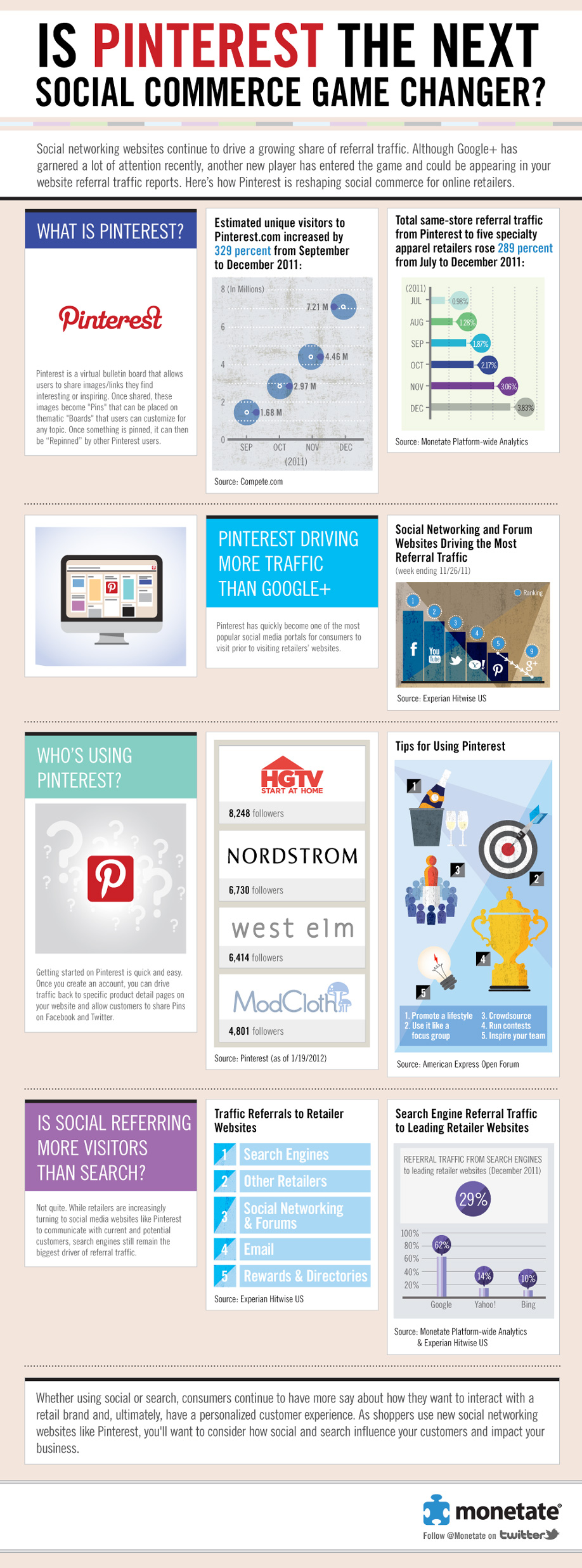
Here’s an infographic for some Pinterest stats…one of which is that 97% of Pinterest’s Facebook fans are women! Apparently Pinterest has no revenue business model right now and is focused on growing the service.
 

Another Infographic: Is Pinterest The Next Social Commerce Game Changer?
 

GTA Technology Topics, Tips & Tricks: Social Bookmarking & Recommender Sites


Here are some great websites to take a look at for social bookmarking (excluding Twitter and related web applications). Social bookmarking tools can be used to find recommendations, what is popular, share what you love, and find further information on a topic. This recent article by eBizMBA lists the top 15 of February 2012. The hottest social bookmarking website right now is Pinterest. It does look pretty cool.  I wish I had the time to use all these social bookmarking tools!
 
Pinterest – “Pinterest lets you organize and share all the beautiful things you find on the web. People use pinboards to plan their weddings, decorate their homes, and organize their favorite recipes.”  I love how visually-based this website is! With such cool pin boards as “Plan a Wedding” or “Save your inspirations.”
 
Reddit – “The front page of the Internet.” Lists links and ranks the most popular websites on the Internet and websites that are trending. 
 
Delicious – “Delicious helps you find cool stuff and collect it for easy sharing. Dig into stacks created by the community, and then build your own!” 
 
Digg – “Digg is a place for people to discover and share content from anywhere on the web. From the biggest online destinations to the most obscure blog, Digg surfaces the best stuff as voted on by our community.”
 
StumbleUpon – “We help you explore new and interesting things from every corner of the Web.”  You tell StumbleUpon what you like and it will recommend web pages, videos, photos and more that “you wouldn’t have found on your own.”
 
GetGlue – “GetGlue is a social network for entertainment. Users check-in and share what they are watching, listening to and reading with friends; get fresh recommendations, exclusive stickers, discounts and other rewards from their favorite shows and movies.”