
Author Archives: infophile
The 5 Best Free Word Processors | Mashable
We’ve all used Microsoft Word, the most ubiquitous word processor on the market, at one point in our lives. It still proves to be a staple, especially in education, but there are plenty of competitors vying for our word processing loyalty.
If you aren’t a fan of Word, aren’t interested in purchasing a full office suite, or you really just need a new, free word processor, check out the best of the best below.
Includes overviews of:
- Google Docs
- Textilus – Microsoft Word Edition
- TextEdit
- Kingsoft Office Writer
- Pages
Read: The 5 Best Free Word Processors | Mashable.
If you have OS X my recommendation would be the open source word processor Bean over TextEdit.
8 Questions To Ask Your Boss That Can Make Or Break Your Career | Fast Company
Feedback from your supervisor is what you crave, unless you’re happy flying under the radar, which certainly won’t help you advance. Getting honest input from your supervisor is crucial to your relationship with your boss–and, like it or not, your relationship with your boss can make or break your career. A solid rapport makes deadlines a breeze and the workday go by in a flash; but a shaky one can render even a short elevator ride interminable.
Plus, having a good relationship with your boss may even reduce stress at work. In aworkplace study by the American Psychological Association, up to 75% of respondents said the most stressful aspect of their job is their immediate boss.
Here, we asked an expert to share a few key questions you can ask that will help you and your supervisor get on (or stay on) the right track.
Read: 8 Questions To Ask Your Boss That Can Make Or Break Your Career | Fast Company
Networked Worlds & Networked Enterprises | Pew Research Center
Networked Worlds & Networked Enterprises
Lee Rainie, Director of the Pew Research Center’s Internet Project, shows how the large, loosely knit social circles of networked individuals expand opportunities for learning, problem solving, decision making, and personal interaction.
The new social operating system of “networked individualism” requires us to develop networking skills and strategies, work on maintaining ties, and balance multiple overlapping networks. The “triple revolution” that has brought on this transformation: the rise of social networking, the capacity of the Internet to empower individuals, and the always-on connectivity of mobile devices.
Drawing on extensive evidence, Rainie examines how the move to networked individualism has driven changes in organizational structure, job performance criteria, and the way people interact in workplaces. He presents a glimpse of the new networked enterprise and way of working.
Data Science: More Than Mining [Infographic] | Visual.ly
Image

31 Free Live Webinars for Librarians in November | Ellyssa Kroski | OEDB.org
November is chock-full of great opportunities for continued learning in the library field. Several of these look amazing including the webinars on the new Congress.gov website, responsive web design, and apptastic marketing. See the list: 31 Free Live Webinars for Librarians in November | Ellyssa Kroski | OEDB.org.
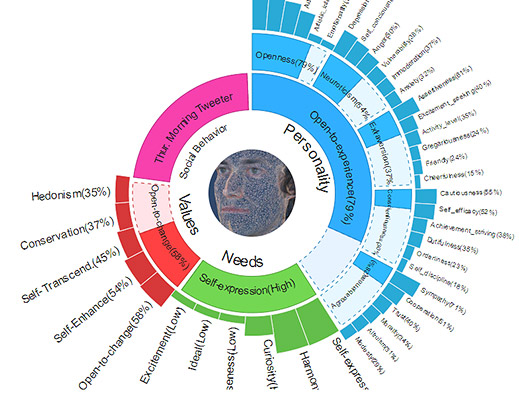
IBM Software Learns Your Personality, Could Tailor Ads Accordingly | MIT Technology Review
Trying to derive a person’s wants and needs—conscious or otherwise—from online browsing and buying habits has become crucial to companies of all kinds.
Now IBM is taking the idea a step further. It is testing technology that guesses at people’s core psychological traits by analyzing what they post on Twitter, with the goal of offering personalized customer service or better-targeted promotional messages.
Read more: IBM Software Learns Your Personality, Could Tailor Ads Accordingly | MIT Technology Review.
History of #Hashtags [Infographic] | Offerpop
In just 6 years hashtags have evolved from a simple symbol to one of today’s most valuable marketing tools.
And it doesn’t stop there. Hashtags have integrated the lives of every day people, every day. From a student’s Instagram pic to a CMO’s tweets, the use of hashtags have accelerated into mass popularity.
In this infographic, we’ve compiled some key moments of the hashtag’s lifetime to get a better idea of how this common sign turned into a global icon.
For marketers, the hashtag’s short, but rich history proves its ability to attract attention and build conversations around your message.
via History of #Hashtags | Offerpop.
You may also like:
- The Beginner’s Guide to the Hashtag | Mashable
- How to choose a hashtag [Infographic] | Twitter Blogs

8 Apps to Make You a Better Reader | Mashable
How many books did you read last year? If your answer is more than one, congratulations: you’re more well-read than about 25% of Americans over age 16, according to a 2012 Pew Internet survey.
Ironically, as we become more surrounded by words in the digital age, less of us are finding time to actually read them. The good news is that your smartphone or tablet can help.
Trying to stray from the obvious reading apps, like e-readers, we’ve gathered eight excellent apps that’ll help you improve your reading ability and become a better literary citizen, while simultaneously boosting your brain function.
Whether you’d like to read more, faster or some combination of the two, these apps will light your path to wisdom.
Includes overviews of the following apps:
- Instapaper
- Syllable
- Dictionary.com
- Readmill
- Goodreads
- Longform app for iPad
- Lumosity
- Audible
Seven Ways To Use GitHub That Aren’t Coding | ReadWrite
GitHub is so often touted as a tool for coding projects that it’s easy to forget just how useful a resource it is for everything else.
At the heart of GitHub are two collaborative functions—forking and branching—that aren’t exclusive to coding. Forking means to create a clone of somebody else’s work for remixing. Branching is a way for each person in a group to create a temporary clone for tandem editing, and then push those updates back to the group project again.
While many of GitHub’s capabilities require knowledge of Git…forking and branching can both be done with nothing more than a GitHub account and a few clicks. GitHub has the additional benefit of a liberal use policy, so you are in complete control of anything you upload there.
The 7 ways discussed:
- Travel Logging
- Musical Composition
- Remixing Recipes
- Open Source Font Editing
- Data Visualization For Journalists
- Writing and Blogging
- Legal Documents
Read: Seven Ways To Use GitHub That Aren’t Coding | ReadWrite.
You may also like:
 infophile