Whether or not your child grows up to be the next Zuckerberg, programming is a highly useful skill for him or her to learn. It teaches vital problem-solving, creativity, and communication skills. Plus, it can be downright fun for you both. Here are some of the best tried-and-true apps for teaching kids of all ages how to code.
Its just amazing how apps are transforming not only the technology sector but education, health care, business, etc. All one needs is an idea, a presentation and either partners/funders or access to platforms like KickStarter.
The clincher, the thing that made Quick Key go viral, was a poorly-lit video of an excitable guy holding his iPhone up to a Scantron page, one of those test pages you used to fill out in school. He thumbs through page after page, making comments on students’ performance as the app scans the page and instantly reports a grade. The video was amazingly compelling. The creator, Walter O. Duncan IV, can barely contain his excitement. His app looked great, it worked seamlessly, and the video struck a nerve with students and teachers, pocketing 260,000 views on YouTube and popping up on the front page of Reddit.
This, my friends, is how you do a viral video.
Duncan’s company is called Design by Educators, Inc and has raised over $99,500 to build the app and begin bringing on beta testers. The other co-founders are Isaac D. Van Wesep, and Marlon Davis.
“We worked hard to build an amazing prototype. But now we need real teachers to beta test Quick Key. My goal was to recruit 100 teachers with the video. As of tonight, over 1,000 people have signed up to learn about beta testing,” said Duncan.
A 13-year veteran school teacher, Duncan knows how to reach a crowd. He’s worked in inner-city districts in Detroit, DC, LA, and Brooklyn. He’s also host of a Facebook group called Teacher’s Round Table and is still a full-time teacher in Cambridge, Mass. His co-founders, Davis and Van Wesep, are also experience educators and entrepreneurs.
“We do not have customers as we are pre-beta but the video did drive over 10,000 visitors to our site in 48 hours,” said Van Wesep. “Our company is the only one making a product like Quick Key with real working K-12 teachers on the founding team. Since teachers designed Quick Key, it actually works for teachers, instead of making work for teachers.”
The product’s origin story began in 2007 when Duncan began giving his students “exit tickets,” short quizzes on the knowledge learned that day. This helped the teachers know what the students retained and, more importantly, what they’d have to cover again the next day.
“But there was a cost: grading of the exit tickets was done by hand, and all results had to be entered into the school’s central digital electronic grade book, or school management system,” said Van Wesep. “With some 90 students in his care, Walter was spending nearly two hours a night, just grading the exit tickets, and transcribing the results. It was mind-numbing.”
The solution came to him in 2011 when he realized the easiest way to scan these tickets was with a hand-held device – his phone. Thus Quick Key was born.
“If teachers make the best assessments, and the best lesson plans, and the best teaching materials, won’t they make the best software too? the response to Quick Key is bearing out that theory,” he said.
The app is still in early beta but a number teachers have already signed up to try it and they’re working on improving it for general use. It’s rare to see an app go so viral so quickly and it’s a testament to the dedication of a group of teachers and entrepreneurs that they’ve been able to go from zero to viral in a few short hours.
I have used the Evernote service for years. I have found the more organized your notebooks and notes are, the more useful the service is. For search and discovery metadata is key – add tags, create explicit titles and create hierarchies of your notebooks. I especially like the eClip plugin for Internet browsers, the sync function and using the service across multiple devices.
Google has a history of retiring applications and emphasizing social. The social element is not important to me and i’m resentful of Google’s actions regarding the retirement of Google Reader and the most recent changes to its algorithms in Google Search. I will be not be switching to Google Keep, and for my current needs, I only need one note-taking service.
“We tested out Google’s newest app — looking at everything from its interface to its functionality — and put it all on video. Watch our hands-on with Google Keep.”
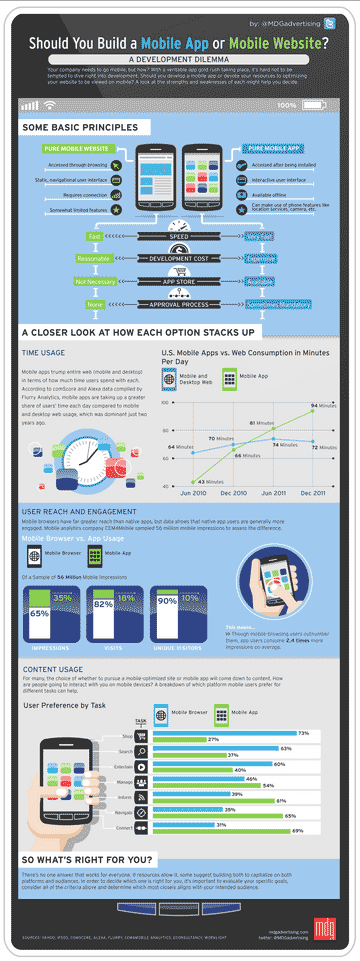
Most businesses and organizations have websites, and with the popularity and proliferation of all sizes of mobile devices, a mobile strategy for those websites is more important than ever.
“For the full potential of the Internet of Things to be realized, however, cloud computing is fundamental. The whole idea behind the connected objects is that the data they collect is mostly streamed online, so that applications can gather, parse, and act on this data efficiently….The cloud is the natural home for these applications.”
Update (August 30, 2015): Coding resources available on the Internet are listed here.
I began learning to code more than a decade ago during my undergraduate days at university sitting in a darkened room in front of a SunSystem computer running Unix. I programmed in C++ and Java for endless hours. I never complained about my biology and math labs and tutorials again after taking a computer science class! I did not realize at the time how useful I would find this skill in future years. During my Masters, which I completed in 2012, I learned to program in HTML/XHTML and CSS from the ground up, although I had prior knowledge from building my own websites. Now my next goals are to learn to code PHP and APIs. I not only want to learn these languages to bolster my resume but to learn more about the fundamentals of Internet and mobile architecture. How they are connected. I think learning to code is a great way to learn how to solve problems.
I find it surprising how popular coding is becoming, especially in libraries. Although now with the morphing of hackerspaces and makerspaces in libraries maybe its not so surprising. Librarians are known for being pioneers in education, learning and collaborative efforts after all. We can now even learn a programming language by attending a conference session – the 2013 ALA Conference in June will be presenting a LITA Pre-conference Introductory Python Workshop. 2012 was known as Code Year. With this push for awareness and education of coding there are now numerous resources one can use to learn abut coding and how to code. Here are a few of them:

 infophile