Make Instant Calculations and Conversions in Your Browser’s Search Bar | LifeHacker


Perform these calculations and conversions right in your browser’s search field—without ever having to hit enter for the results.

The secret sauce is Google’s predictive search technology, which suggests search results as you type. You’ll need to have Google as your main search engine and its suggestions enabled in your browser of choice (whether that’s Chrome, Firefox, IE, or Safari).

via Make Instant Calculations and Conversions in Your Browser’s Search Bar  | LifeHacker


Make Web sites mobile-friendly or face Google search wrath | Internet & Media – CNET News


If smartphone users have problems with your site, here’s some incentive to fix them: Google said Tuesday it plans to punish problematic sites with lower placement in search results.

via Make Web sites mobile-friendly or face Google search wrath | Internet & Media – CNET News.

This Google Trends Visualization Will Mesmerize You | Mashable


This Google Trends Visualization Will Mesmerize You | Mashable

Google Trends

See Google trends visualizations tool here. You can choose to view the number of trends by changing the matrix size clicking the icon on the top-left of the screen. Definitely mesmerizing!

Google Will Soon Launch Google Web Designer, A Free HTML5 Development Tool For Creating Web Apps, Sites And Ads | TechCrunch


Google will soon launch Google Web Designer, an HTML5 development tool for “creative professionals.” The service, Google says, will launching within “the coming months” and is meant to “empower creative professionals to create cutting-edge advertising as well as engaging web content like sites and applications – for free.”

Google’s only service for creating websites right now is Google Sites, which allows you to easily create basic sites and wikis from pre-built templates. That product has lingered without any meaningful updates for a while now, so maybe Web Designer will be a more sophisticated replacement for Sites’ editor.

via Google Will Soon Launch Google Web Designer, A Free HTML5 Development Tool For Creating Web Apps, Sites And Ads | TechCrunch.

Google, social media and librarians | Phil Bradley


via Google, social media and librarians – YouTube.

Google Takes Street View Trekker And Underwater Cameras To The Galapagos Islands | Tech Crunch


Google today announced that it has been taking its Street View Trekker – the compact backpack version of its Street View cars – and its underwater Street View cameras to the Galapagos Islands and that it plans to make these images available on Google Maps later this year. The company worked together with the Charles Darwin Foundation, the Galapagos National Parks Directorate and, for the underwater survey, the Catlin Seaview Survey.

via Google Takes Street View Trekker And Underwater Cameras To The Galapagos Islands  | Tech Crunch

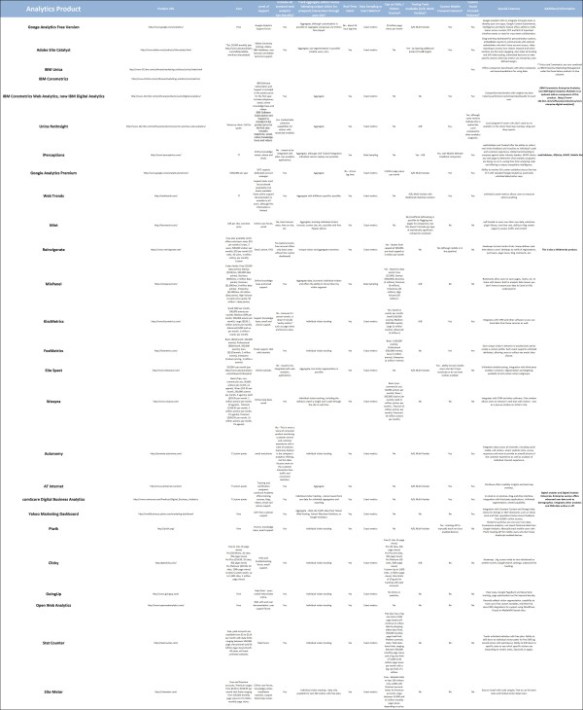
25 Alternatives to Google Analytics – Stephen’s Lighthouse


For the full article see 25 Alternatives to Google Analytics – Stephen’s Lighthouse.

25 Alternatives to Google Analytics

Google Framed As Book Stealer Bent On Data Domination In New Documentary | TechCrunch


Google Framed As Book Stealer Bent On Data Domination In New Documentary | TechCrunch

Google and the World Brain

Quotable: “From the second it starts, director Ben Lewis’ opinion is clear: Google Books is as an insidious plot for data domination. See, Google didn’t just want to make a universally accessible library. It wanted to use all the knowledge to improve its search and artificial intelligence projects.”

To Keep or Not to Keep (Google Keep vs. Evernote)


I have used the Evernote service for years. I have found the more organized your notebooks and notes are, the more useful the service is. For search and discovery metadata is key – add tags, create explicit titles and create hierarchies of your notebooks. I especially like the eClip plugin for Internet browsers, the sync function and using the service across multiple devices.

Google has a history of retiring applications and emphasizing social. The social element is not important to me and i’m resentful of Google’s actions regarding the retirement of Google Reader and the most recent changes to its algorithms in Google Search. I will be not be switching to Google Keep, and for my current needs, I only need one note-taking service.

“We tested out Google’s newest app — looking at everything from its interface to its functionality — and put it all on video. Watch our hands-on with Google Keep.”

via Here’s Everything You Need to Know About Google Keep (Video) | Mashable

You may also like:

Google Reader – Resources for Alternatives


I think Google has underestimated the number of Google Reader users. There has been a very vocal backlash from the bloggers, journalists, reporters, media personnel, and information professionals, etc. who use the service the most. Its very disappointing to me this service is being retired when its so useful. Personally, I use the service daily following over 100 blogs on a variety of topics. Retiring Google Reader is not going to instantly make me sign up for Google+ or other Google products either. Fortunately alternatives are available and being improved in response.

Google Reader Retires July 1st: Options for When Google Sucks | Stephen’s Lighthouse

3 Great Alternatives To Gooogle Reader and How to Transfer Your Feeds Before The Shut Down | iLibrarian

8 Google Reader Alternatives That Will Ease Your RSS Pain | Gizmodo

Check Out These Google Reader Alternatives | Mashable