11 Web-based Polling and Survey Tools


Free Technology for Teachers: 11 Web-based Polling and Survey Tools.

The 2012 Horizon Report is Now Available


As mentioned at Stephen’s Lighthouse. 2012 Horizon Report from EDUCAUSE and New Media Consortium.

Historical publications of the Horizon Report can be found here.

Information Space: 61 Tech Geek Jobs for LIS Grads


A survey of the current offering of non-traditional LIS job in the United States from Information Space – the Syracuse University iSchool blog.

61 Tech Geek Jobs for LIS Grads.

SLA Non-Traditional Library Jobs Webinar


Slides & Audio Recording from Non-Traditional Library Jobs Webinar, Jan. 17 | SLA Illinois Chapter.

GTA Technology Topics, Tips and Tricks: Timeline Tools


I was asked whether I knew of any good timeline maker tools and I actually have never used one before. I did some investigating into what is available and am passing along the tools I found.
 
This article by makeuseof looks at two easy to use tools Tiki-Toki and Dipity.
 
Tiki-Toki – Looks impressive but basic/free account has restrictions.
 
Dipity – More basic than Tiki-Toki but may not work well for print purposes. Looks great for web purposes and sharing.
 

TimeRime – Create, view, share and compare timelines. Basic account probably has some restrictions.

 
TimeGlider – This one looks more advanced and again may not work well for print purposes. Application moving away from Flash and will use a Javascript plugin. Complicated installation.
 
Timeline – This one is cross platform, free and open source. Requires installation. May be the best to use for print purposes. Mac OSX users may have to install from the command line.
 
Another option is to install a PowerPoint plugin from Office Timeline. This looks like the best option for print purposes.

 

FLIF Freedom to Read Week at University of Alberta!


The Future Librarians for Intellectual Freedom are an amazing student group of volunteers at the University of Alberta. They hold events throughout the year in Edmonton promoting intellectual freedom within library and information services. They also arrange community events to help raise awareness about intellectual freedom and social responsibility.

Future Librarians for Intellectual Freedom: Welcome to Freedom to Read Week!.

Dr. Toni Samek teaches courses on special populations and intellectual freedom & social responsibility at The University of Alberta’s School of Library and Information Studies. She just won a National Teaching Fellowship from 3M and the courses she teaches are well regarded and transformative. I would encourage students interested in these topics within an MLIS program to consider the University of Alberta.

GTA Technology Topics, Tips and Tricks: Pinterest


As an update to my prior post on Social Bookmarking, this post is dedicated to the new hot social media trend Pinterest (though it has been around since 2008).
 
Pinterest is a website of virtual inboards. From an LIS perspective, users “catalog” items and create visual collections by topic/interest/category.
 
Some may argue its an advertising tool to sell things and promote brands…I think Pinterest is a great tool to see what’s trending and popular.
 
Pinterest may have useful applications for libraries as discussed in these posts by the iLibrarian “5 Ways to Use Pinterest in Your Library” and “5 More Ways to Use Pinterest in You Library“.
 
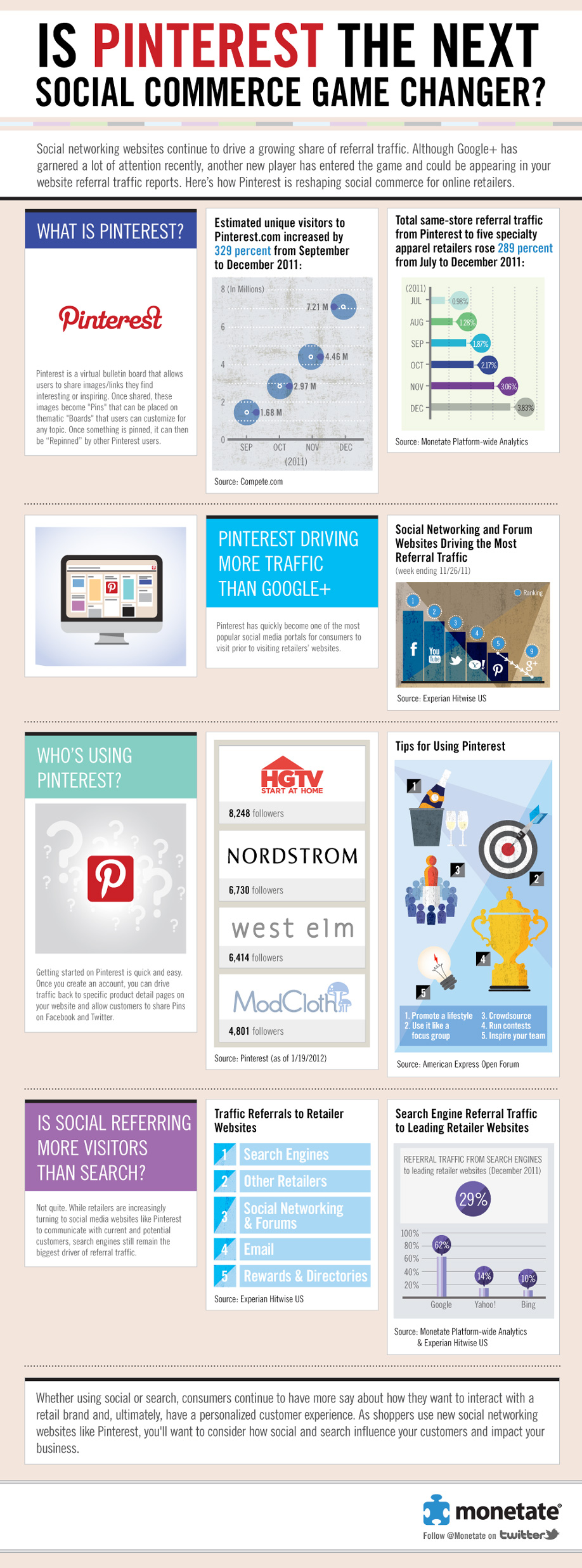
Here’s an infographic for some Pinterest stats…one of which is that 97% of Pinterest’s Facebook fans are women! Apparently Pinterest has no revenue business model right now and is focused on growing the service.
 

Another Infographic: Is Pinterest The Next Social Commerce Game Changer?


GTA Technology Topics, Tips and Tricks: Diversions


Here are some diversions in anticipation of University of Alberta’s Reading Week break. Some are informative, some are fun.


Oldies but Goodies
Mr. Bean Library (Video)
 
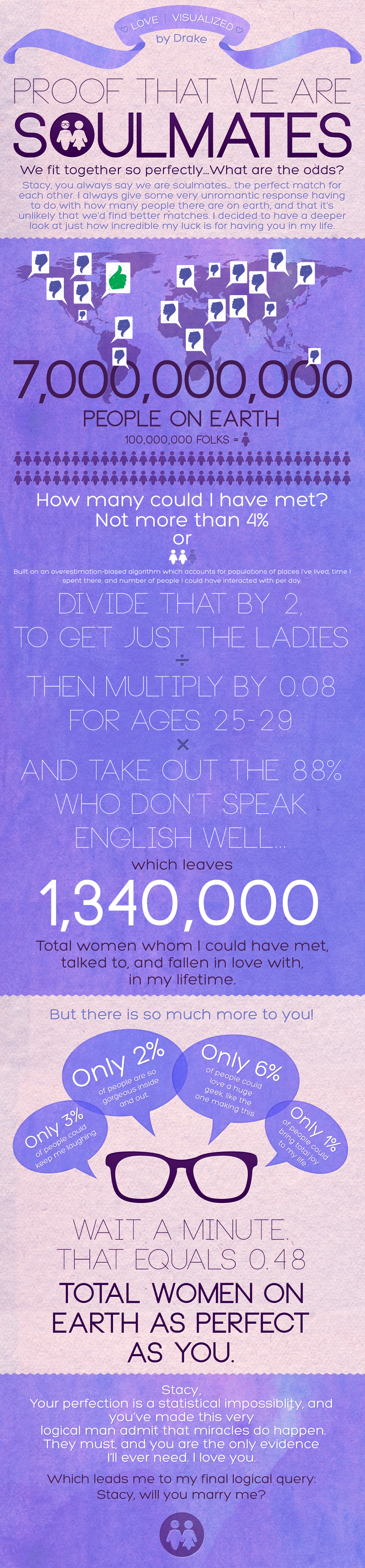
And because I know you know I love infographics…and to celebrate Valentine’s Day…the Stacy Green, Will You Marry Me Infographic
 

GTA Technology Topics, Tips & Tricks: Social Bookmarking & Recommender Sites


Here are some great websites to take a look at for social bookmarking (excluding Twitter and related web applications). Social bookmarking tools can be used to find recommendations, what is popular, share what you love, and find further information on a topic. This recent article by eBizMBA lists the top 15 of February 2012. The hottest social bookmarking website right now is Pinterest. It does look pretty cool.  I wish I had the time to use all these social bookmarking tools!
 
Pinterest – “Pinterest lets you organize and share all the beautiful things you find on the web. People use pinboards to plan their weddings, decorate their homes, and organize their favorite recipes.”  I love how visually-based this website is! With such cool pin boards as “Plan a Wedding” or “Save your inspirations.”
 
Reddit – “The front page of the Internet.” Lists links and ranks the most popular websites on the Internet and websites that are trending. 
 
Delicious – “Delicious helps you find cool stuff and collect it for easy sharing. Dig into stacks created by the community, and then build your own!” 
 
Digg – “Digg is a place for people to discover and share content from anywhere on the web. From the biggest online destinations to the most obscure blog, Digg surfaces the best stuff as voted on by our community.”
 
StumbleUpon – “We help you explore new and interesting things from every corner of the Web.”  You tell StumbleUpon what you like and it will recommend web pages, videos, photos and more that “you wouldn’t have found on your own.”
 
GetGlue – “GetGlue is a social network for entertainment. Users check-in and share what they are watching, listening to and reading with friends; get fresh recommendations, exclusive stickers, discounts and other rewards from their favorite shows and movies.”
 

Mentoring 2.0


HLWIKI Canada provides a Mentoring 2.0 summary (mentoring in web 2.0 context) and references for Library and Information Studies students.