Top 100 Tools for Learning 2013 | Jane Hart | Centre for Learning and Performance Technologies


Google Launches Web Designer, A Visual Tool For Building Interactive HTML5 Sites And Ads | TechCrunch


Google today announced the launch of Web Designer, a new tool for building interactive HTML5 sites and ads. The company first hinted at this launch in June, but had been quiet about it ever since. Web Designer, which Google calls a “professional-quality design tool,” is now officially in public beta and available for download for Mac and Windows.

Read: Google Launches Web Designer, A Visual Tool For Building Interactive HTML5 Sites And Ads | TechCrunch.

Google’s Comparison Tool Compares Two Things Quickly | LifeHacker


Google has added a new comparison tool to its search results that allows you to compare two things with a simple search query. 

The new search option is super easy to use. Just type the two things you want to compare and let Google do it’s thing. Currently, searches work for nutrition info, celestial objects, and a few other things.

Google Compare

Read: Google’s Comparison Tool Compares Two Things Quickly | LifeHacker.

24 Essential Mind Mapping and Brainstorming Tools | Mashable


Mind mapping is the process of using visual diagrams to show the relationships between ideas or information. Its popular uses include project planning, collecting and organizing thoughts, brainstorming and presentations — all in order to help solve problems, map out resources and uncover new ideas.

It can be more useful than trying to keep track of our ideas by scribbling them on paper, and can aid in manipulating and generating concepts.

We’ve compiled a list of 24 mind mapping tools to help you organize, summarize and visualize information, with both free and paid versions available to suit any budget or requirement. The tools mentioned are either browser- or desktop-based, with a selection of mind mapping mobile apps at the end of the article for use on iOS and Android devices.

See the list: 24 Essential Mind Mapping and Brainstorming Tools | Mashable.

Researchers build[ing] ‘Google Earth’ project for the ancient world | theguardian.com


A tool developed by researchers at Southampton University has indexed historic maps, photos and historic documents to provide a simple location search tool for the UK.

The Pelagios 3 project takes data from ancient Latin and Greek sources, which formed the basis of two previous Pelagios projects, and builds on it with documents and maps from Arabic sources, medieval European and Chinese maps, and seafaring charts from the 13th century, cross-linking them into one searchable database. 

Read the full story: Researchers build ‘Google Earth’ project for the ancient world | Technology | theguardian.com.

20 Tools to Showcase Your Portfolio | Mashable


Working in a creative industry often means that you need to present your work on a global stage, using an attractive and professional platform. A great portfolio can help you land clients while building your brand and network, so it’s essential to get it right.

However, creating a beautiful, functional portfolio can be complicated and time-consuming, especially if you have no prior design or coding knowledge. Not to worry — there are plenty of online tools that can help you get your portfolio up and running in no time.

Tools reviewed:

  1. Carbonmade
  2. Behance
  3. Dribbble
  4. Dunked
  5. Coroflot
  6. Viewbook
  7. Portfolio Box
  8. deviantART
  9. Shown’d
  10. Subfolio
  11. Crevado
  12. Portfoliopen
  13. Jobrary
  14. design:related
  15. Krop
  16. Cargo Collective
  17. Brushd
  18. Sliding Boxes
  19. Portfolio Lounge
  20. Folio24

via 20 Tools to Showcase Your Portfolio | Mashable.

7 Things You Didn’t Know Bitly Could Do | Mashable


7 Things You Didn’t Know Bitly Could Do | Mashable

The post reviews:

  1. Monitor your stats.
  2. Make it your own.
  3. Bundle your links.
  4. It knows what’s important.
  5. It works on your phone — and in Chrome.
  6. Link it to your blog.
  7. Use shortcuts.

Ron McCallum: How technology allowed me to read | TED.com


Months after he was born, in 1948, Ron McCallum became blind. In this charming, moving talk, he shows how he is able to read — and celebrates the progression of clever tools and adaptive computer technologies that make it possible. With their help, and that of generous volunteers, he’s become a lawyer, an academic, and, most of all, a voracious reader. Welcome to the blind reading revolution.

via Ron McCallum: How technology allowed me to read | Video on TED.com.

Topsy Has Every Tweet Ever | Stephen’s Lighthouse


Topsy Has Every Tweet Ever | Stephen’s Lighthouse

Great Web Tools | edtechteacher.org


In order to help educators integrate technology effectively, we have compiled a list of technology tools focused on learning goals consistent with the CRCD [collect-relate-create-donate] framework. Unlike other lists that promote “cool tools,” yet leave teachers wondering about purposeful educational integration, our list is driven by specific learning goals that promote critical-thinking, creativity, collaboration, and community-mindedness. We hope you will find our list useful.

What are your Learning Goals?

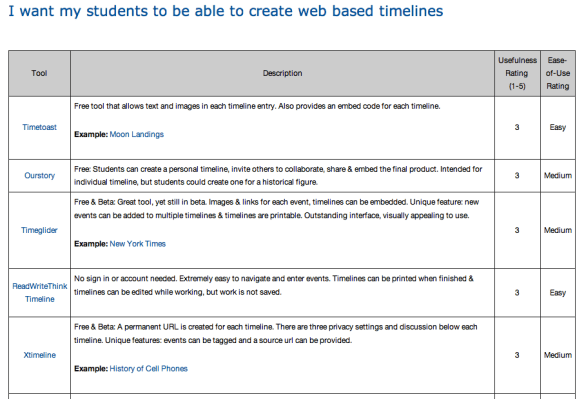
  1. I want my students to be able to create web based timelines.
  2. I want my students to create web based mind maps / graphic organizers.
  3. I want my students to publish their writing online for others to read.
  4. I want real-time, online discussion with my students.
  5. I want my students to search and evaluate web sites.
  6. I want to create guided research activities for my students.
  7. I want to connect my students to other students around the world.
  8. I want my students to create online portfolios.
  9. I want my students to create books, magazines, posters, or newsletters online.
  10. I want my students to record or edit audio.
  11. I want to use an interactive whiteboard effectively with my students.
  12. I want my students to create and edit maps.
  13. I want my students to draw or create comics on the Internet.
  14. I want to create tests, quizzes, and games online.
  15. I want my students to organize, bookmark and edit their research online.
  16. I want to find or create rubrics for multimedia projects.
  17. I want to connect to other teachers to share ideas and resources.

A comprehensive resource recommending a variety of tech according to each learning goal, as listed above. This is also a great resource for anyone looking for unique tech tools related to the activities listed.
techtools

via Great Web Tools | edtechteacher.org.
